How modern browsers work

Web developers often treat the browser as a black box that magically transforms HTML, CSS, and JavaScript into interactive web applications. In truth, a modern web browser like Chrome (Chromium), Firefox (Gecko) or Safari (WebKit) is a complex piece of software. It orchestrates networking, parses and executes code, renders graphics with GPU acceleration, and isolates content in sandboxed processes for security.
Web 开发者常常将浏览器视为一个黑盒,仿佛它会把 HTML、CSS 和 JavaScript 自动转成交互式 Web 应用。实际上,Chrome(Chromium)、Firefox(Gecko)或 Safari(WebKit)这样的现代浏览器是复杂的软件:它协调网络通信,解析和执行代码,使用 GPU 加速渲染图形,并在沙盒进程中隔离内容以提升安全性。
This article dives into how modern browsers work - focusing on Chromium’s architecture and internals, while noting where other engines differ. We’ll explore everything from the networking stack and parsing pipeline to the rendering process via Blink, JavaScript engine via V8, module loading, multi-process architecture, security sandboxing, and developer tooling. The goal is a developer-friendly explanation that demystifies what happens behind the scenes.
本文深入探讨了现代浏览器的工作原理,重点关注 Chromium 的架构和内部机制,同时指出其他引擎的差异。我们将从网络栈、解析管道到 Blink 的渲染过程、V8 的 JavaScript 引擎、模块加载、多进程架构、安全沙箱和开发者工具等方面进行全面探索。目标是提供开发者友好的解释,揭开幕后发生的事情。
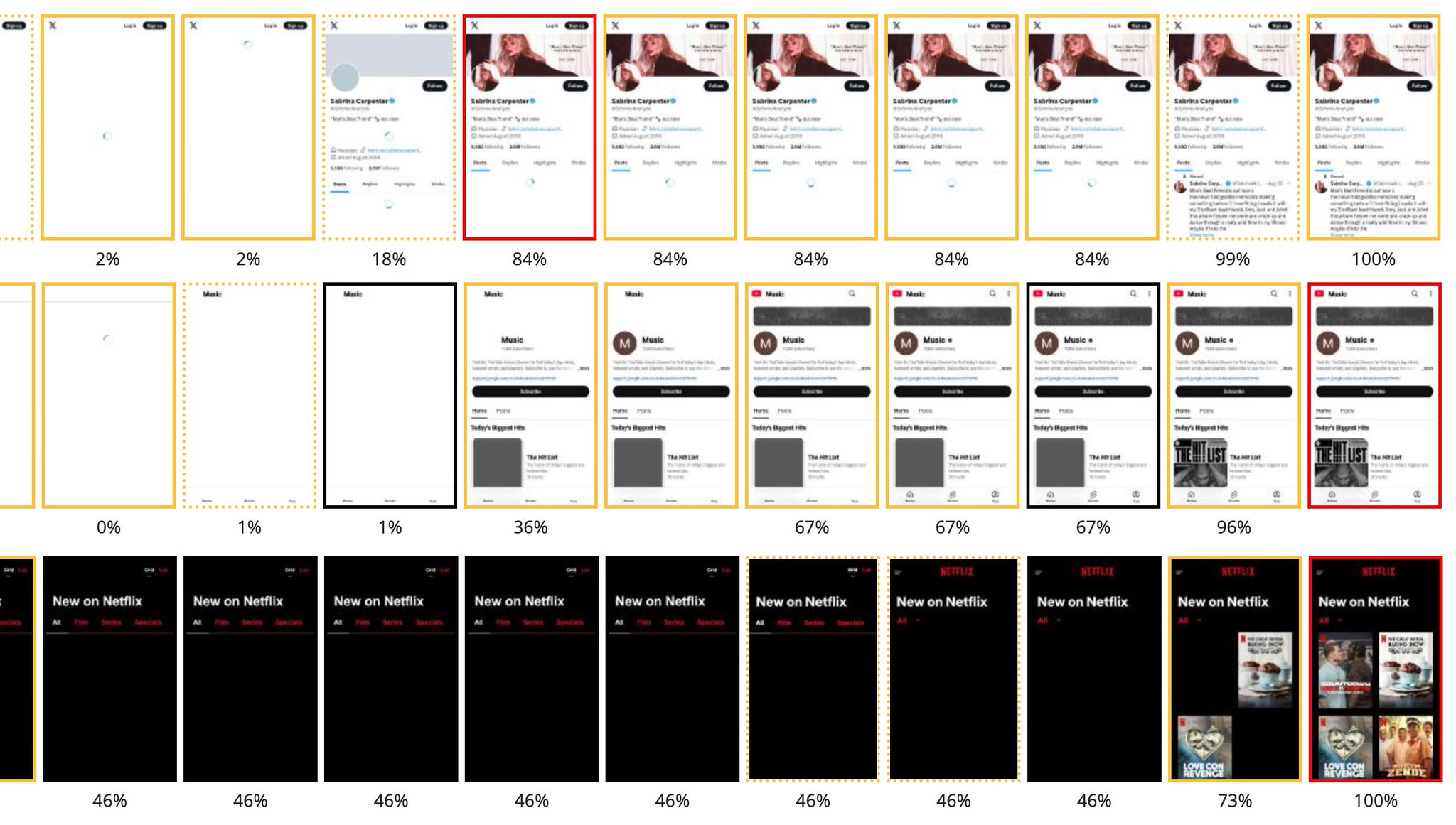
Let’s begin our journey through the browser’s internals.
让我们开始探索浏览器的内部机制。
Networking and Resource Loading
网络与资源加载
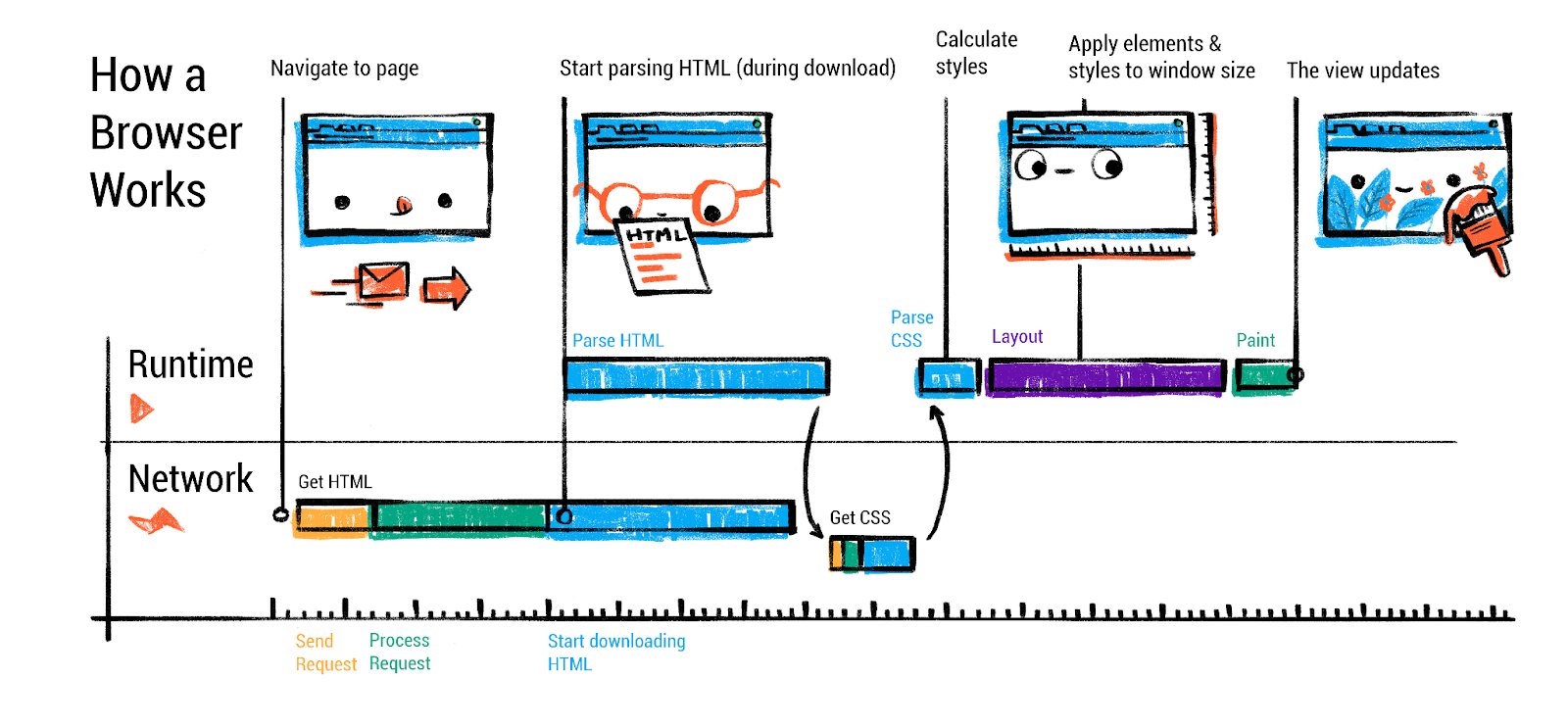
Every page load begins with the browser’s networking stack fetching resources from the web. When you enter a URL or click a link, the browser’s UI thread (running in the “browser process”) kicks off a navigation request.
每页加载都从浏览器的网络栈开始,从网络获取资源。当你输入 URL 或点击链接时,浏览器的 UI 线程(在”浏览器进程”中运行)会启动一个导航请求。
The browser process is the main, controlling process that manages all other processes and the browser’s user interface. Everything that happens outside of a specific web page tab is controlled by the browser process.
浏览器进程是主控进程,管理所有其他进程和浏览器的用户界面。除了特定网页标签之外的所有操作都由浏览器进程控制。
The steps include:
步骤包括:
URL parsing and security checks: The browser parses the URL to determine the scheme (http, https, etc.) and target domain. It also decides if the input is a search query or URL (in Chrome’s omnibox, for example). Security features like blocklists may be checked here to avoid phishing sites.
URL 解析和安全检查:浏览器解析 URL 以确定协议(http、https 等)和目标域名。它还会判断输入是搜索查询还是 URL(例如 Chrome 的地址栏)。可能会在此处检查安全功能(如黑名单),以避免网络钓鱼网站。
DNS lookup: The network stack resolves the domain name to an IP address (unless it’s cached). This may involve contacting a DNS server. Modern browsers might use OS DNS services or even DNS over HTTPS (DoH) if configured, but ultimately they obtain an IP for the host.
DNS 查询:网络栈将域名解析为 IP 地址(除非已缓存)。这可能涉及联系 DNS 服务器。现代浏览器可能会使用操作系统 DNS 服务,甚至如果配置了 DNS over HTTPS(DoH),还会使用 DoH,但最终它们会获取主机的 IP 地址。
Establishing a connection: If no open connection to the server exists, the browser opens one. For HTTPS URLs, this includes a TLS handshake to securely exchange keys and verify certificates. The browser’s network thread handles protocols like TCP/TLS setup transparently.
建立连接:如果服务器不存在打开的连接,浏览器将打开一个。对于 HTTPS URL,这包括一个 TLS 握手,以安全地交换密钥并验证证书。浏览器的网络线程透明地处理 TCP/TLS 设置等协议。
Sending the HTTP request: Once connected, an HTTP GET request (or other method) is sent for the resource. Browsers today default to HTTP/2 or HTTP/3 if the server supports it, which allows multiplexing multiple resource requests over one connection. This improves performance by avoiding the old limit of ~6 parallel connections per host (HTTP/1.1). For example, with HTTP/2 the HTML, CSS, JS, images can all be fetched concurrently on one TCP/TLS link, and with HTTP/3 (over QUIC UDP) setup latency is further reduced.
发送 HTTP 请求:一旦连接建立,就会向资源发送 HTTP GET 请求(或其他方法)。如今浏览器默认使用 HTTP/2 或 HTTP/3,如果服务器支持的话,这允许在单个连接上并行传输多个资源请求。这通过避免 HTTP/1.1 中每个主机 ~6 的并行连接限制来提高性能。例如,使用 HTTP/2,HTML、CSS、JS 和图像都可以在单个 TCP/TLS 链路上并行获取,而使用 HTTP/3(基于 QUIC UDP)可以进一步降低延迟。
Receiving the response: The server responds with an HTTP status and headers, followed by the response body (HTML content, JSON data, etc.). The browser reads the response stream. It may need to sniff the MIME type if the Content-Type header is missing or incorrect, to decide how to handle the content. For example, if a response looks like HTML but isn’t labeled as such, the browser will still try to treat it as HTML (per permissive web standards). There are security measures here too: the network layer checks Content-Type and may block suspicious MIME mismatches or disallowed cross-origin data (Chrome’s CORB - Cross-Origin Read Blocking - is one such mechanism). The browser also consults Safe Browsing or similar services to block known malicious payloads.
接收响应:服务器以 HTTP 状态和头部信息响应,随后是响应体(HTML 内容、JSON 数据等)。浏览器读取响应流。如果 Content-Type 头部信息缺失或错误,浏览器可能需要探测 MIME 类型以决定如何处理内容。例如,如果响应看起来像 HTML 但未标记为 HTML,浏览器仍会尝试将其作为 HTML 处理(根据宽松的网页标准)。这里也有安全措施:网络层检查 Content-Type,并可能阻止可疑的 MIME 不匹配或禁止的跨域数据(Chrome 的 CORB - 跨域读取阻止 - 就是其中一种机制)。浏览器还会咨询 Safe Browsing 或类似服务来阻止已知的恶意有效载荷。
Redirects and next steps: If the response is an HTTP redirect (e.g. 301 or 302 with a Location header), the network code will follow the redirect (after informing the UI thread) and repeat the request to the new URL. Only once a final response with actual content is obtained does the browser move on to processing that content.
重定向和下一步操作:如果响应是 HTTP 重定向(例如带有 Location 头的 301 或 302),网络代码将遵循重定向(在通知 UI 线程后),并重复请求新的 URL。只有当获得最终的实际内容响应时,浏览器才会继续处理该内容。
All these steps happen in the network stack, which in Chromium is run in a dedicated Network Service (now typically a separate process, as part of Chrome’s “servicification” effort). The browser process’s network thread coordinates the low-level work of socket communication, using the OS networking APIs under the hood. Importantly, this design means the renderer (which will execute the page’s code) doesn’t directly access the network - it asks the browser process to fetch what it needs, a security win.
所有这些步骤都在网络栈中完成,在 Chromium 中,它在一个专门的网络服务中运行(现在通常是一个单独的进程,作为 Chrome 的“服务化”努力的一部分)。浏览器进程的网络线程协调底层的套接字通信工作,使用底层的操作系统网络 API。重要的是,这种设计意味着渲染器(它将执行页面的代码)不会直接访问网络——它会请求浏览器进程去获取它需要的内容,这是一个安全上的优势。
Speculative Loading and Resource Optimization
推测性加载和资源优化
Modern browsers implement sophisticated performance optimizations in the networking stage. Chrome will proactively perform a DNS prefetch or open a TCP connection when you hover over a link or start typing a URL (using the Predictor or preconnect mechanisms) so that if you click, some latency is already shaved off. There’s also HTTP caching: the network stack can satisfy requests from the browser cache if the resource is cached and fresh, avoiding a network trip.
现代浏览器在网络阶段实现了复杂的性能优化。当您将鼠标悬停在链接上或开始输入 URL 时,Chrome 会主动执行 DNS 预取或打开 TCP 连接(使用 Predictor 或 preconnect 机制),以便在您点击时减少一些延迟。此外还有 HTTP 缓存:如果资源被缓存且仍然新鲜,网络栈可以直接从浏览器缓存中满足请求,避免网络传输。
Preload scanner operation: Chromium implements a sophisticated preload scanner that tokenizes HTML markup ahead of the main parser. When the primary HTML parser is blocked by CSS or synchronous JavaScript, the preload scanner continues examining the raw markup to identify resources like images, scripts, and stylesheets that can be fetched in parallel. This mechanism is fundamental to modern browser performance and operates automatically without developer intervention. The preload scanner cannot discover resources injected via JavaScript, making such resources likely to be loaded consecutively rather than concurrently.
预加载扫描器操作:Chromium 实现了一个复杂的预加载扫描器,在主解析器之前对 HTML 标记进行分词。当主 HTML 解析器被 CSS 或同步 JavaScript 阻塞时,预加载扫描器会继续检查原始标记以识别可以并行获取的资源,如图像、脚本和样式表。这种机制是现代浏览器性能的基础,并且无需开发者干预即可自动运行。预加载扫描器无法发现通过 JavaScript 注入的资源,这使得此类资源更有可能按顺序加载而不是并行加载。
Early Hints (HTTP 103): Early Hints allows servers to send resource hints while generating the main response, using HTTP 103 status codes. This enables preconnect and preload hints to be sent during server think-time, potentially improving Largest Contentful Paint by several hundred milliseconds. Early Hints are only available for navigation requests and support preconnect and preload directives, but not prefetch.
早期提示(HTTP 103):早期提示允许服务器在生成主响应的同时发送资源提示,使用 HTTP 103 状态码。这使服务器思考时间内能够发送 preconnect 和 preload 提示,可能通过数百毫秒改善 Largest Contentful Paint。早期提示仅适用于导航请求,并支持 preconnect 和 preload 指令,但不支持 prefetch。
Speculation Rules API: The Speculation Rules API is a recent web standard that allows defining rules to dynamically prefetch and prerender URLs based on user interaction patterns. Unlike traditional link prefetch, this API can prerender entire pages including JavaScript execution, leading to near-instant load times. The API uses JSON syntax within script elements or HTTP headers to specify which URLs should be speculatively loaded. Chrome has limits to prevent overuse, with different capacity settings based on urgency levels.
推测规则 API:推测规则 API 是一项最新的网络标准,允许根据用户交互模式定义规则,动态预取和预渲染 URL。与传统的链接预取不同,该 API 可以预渲染整个页面,包括 JavaScript 执行,从而实现近乎即时的加载时间。该 API 使用 script 元素内的 JSON 语法或 HTTP 头部来指定哪些 URL 应该被推测性加载。Chrome 有限制以防止过度使用,根据紧急程度设置不同的容量配置。
HTTP/2 and HTTP/3: Most Chromium-based browsers and Firefox support HTTP/2 fully, and HTTP/3 (based on QUIC) is also widely supported (Chrome has it enabled by default for supporting sites). These protocols improve page load by allowing concurrent transfers and reducing handshake overhead. From a developer perspective, this means you may no longer need sprite sheets or domain sharding tricks - the browser can efficiently fetch many small files in parallel on one connection.
HTTP/2 和 HTTP/3:大多数基于 Chromium 的浏览器和 Firefox 完全支持 HTTP/2,而基于 QUIC 的 HTTP/3 也得到了广泛支持(Chrome 默认启用以支持这些网站)。这些协议通过允许并发传输和减少握手开销来提高页面加载速度。从开发者的角度来看,这意味着你可能不再需要精灵表或域名分片技巧——浏览器可以在一个连接上并行高效地获取许多小文件。
Resource prioritization: The browser also prioritizes certain resources over others. Typically, HTML and CSS are high priority (as they block rendering), scripts might be medium (or high if marked defer/async appropriately), and images maybe lower. Chromium’s network stack assigns weights and can even cancel or defer requests to prioritize what’s needed for an initial render. Developers can use link rel=preload and Fetch Priority to influence resource prioritization.
资源优先级:浏览器也会优先处理某些资源。通常,HTML 和 CSS 具有高优先级(因为它们会阻塞渲染),脚本可能是中等优先级(如果适当标记为 defer/async 则可能是高优先级),而图像可能优先级较低。Chromium 的网络栈会分配权重,甚至可以取消或推迟请求以优先处理初始渲染所需的资源。开发者可以使用 link rel=preload 和 Fetch Priority 来影响资源优先级。
By the end of the networking phase, the browser has the initial HTML for the page (assuming it was an HTML navigation). At this point, Chrome’s browser process chooses a renderer process to handle the content. Chrome will often launch a new renderer process in parallel with the network request (speculatively) so that it’s ready to go when the data arrives. This renderer process is isolated (more on multi-process architecture later) and will take over for parsing and rendering the page.
网络阶段结束时,浏览器已经获取了页面的初始 HTML(假设它是一个 HTML 导航)。此时,Chrome 浏览器进程会选择一个渲染进程来处理内容。Chrome 通常会与网络请求并行启动一个新的渲染进程(推测性地),以便在数据到达时能够立即使用。这个渲染进程是隔离的(稍后更多关于多进程架构的内容),并将接管解析和渲染页面的工作。
Once the response is fully received (or as it streams in), the browser process commits the navigation: it signals the renderer process to take the stream of bytes and start processing the page. At this moment, the address bar updates and the security indicator (HTTPS lock, etc.) is shown for the new site. Now the action moves to the renderer process: parsing the HTML, loading sub-resources, executing scripts, and painting the page.
一旦响应完全接收(或随着数据流传输),浏览器进程提交导航:它向渲染进程发送信号,指示其获取字节流并开始处理页面。此时,地址栏更新并显示新站点的安全指示器(如 HTTPS 锁等)。现在操作转移到渲染进程:解析 HTML、加载子资源、执行脚本和绘制页面。
Parsing HTML, CSS, and JavaScript
解析 HTML、CSS 和 JavaScript
When the renderer process receives the HTML content, its main thread begins to parse it according to the HTML specification. The result of parsing HTML is the DOM (Document Object Model) - a tree of objects representing the page structure. Parsing is incremental and can interleave with network reading (browsers parse HTML in a streaming fashion, so the DOM can start being built even before the entire HTML file is downloaded).
当渲染进程接收到 HTML 内容时,其主线程开始根据 HTML 规范进行解析。解析 HTML 的结果是 DOM(文档对象模型)——一个表示页面结构的对象树。解析是增量式的,可以与网络读取交错进行(浏览器以流式方式解析 HTML,因此 DOM 甚至可以在整个 HTML 文件下载完成之前就开始构建)。
HTML parsing and DOM construction: HTML parsing is defined by the HTML Standard as a error-tolerant process that will produce a DOM no matter how malformed the markup is. This means even if you forget a closing </p> tag or have nested tags incorrectly, the parser will implicitly fix or adjust the DOM tree so that it’s valid. For example, <p>Hello <div>World</div> will automatically end the <p> before the <div> in the DOM structure. The parser creates DOM elements and text nodes for each tag or text in the HTML. Each element is placed in a tree reflecting the nesting in the source.
HTML 解析和 DOM 构造:HTML 解析根据 HTML 标准定义为一个容错过程,无论标记如何畸形,它都会生成一个 DOM。这意味着即使你忘记了一个闭合的</p>标签或嵌套标签不正确,解析器也会隐式地修复或调整 DOM 树,使其有效。例如,<p>Hello <div>World</div>会在 DOM 结构中自动在<div>之前结束<p>。解析器为 HTML 中的每个标签或文本创建 DOM 元素和文本节点。每个元素都被放置在一个树中,该树反映了源代码中的嵌套结构。
One important aspect is that the HTML parser may encounter resources to fetch as it goes: for instance, encountering a <link rel=“stylesheet” href=”…”> will prompt the browser to request the CSS file (on the network thread), and encountering an <img src=”…”> will trigger an image request. These happen in parallel to parsing. The parser can keep going while those loads occur, with one big exception: scripts.
一个重要方面是,HTML 解析器在解析过程中可能会遇到需要获取的资源:例如,遇到一个<code><link rel=“stylesheet” href=”…”></code>会提示浏览器请求 CSS 文件(在网络线程上),而遇到一个<code><img src=”…”></code>会触发图像请求。这些操作与解析过程并行发生。解析器可以在这些加载操作进行时继续解析,但有一个例外:脚本。
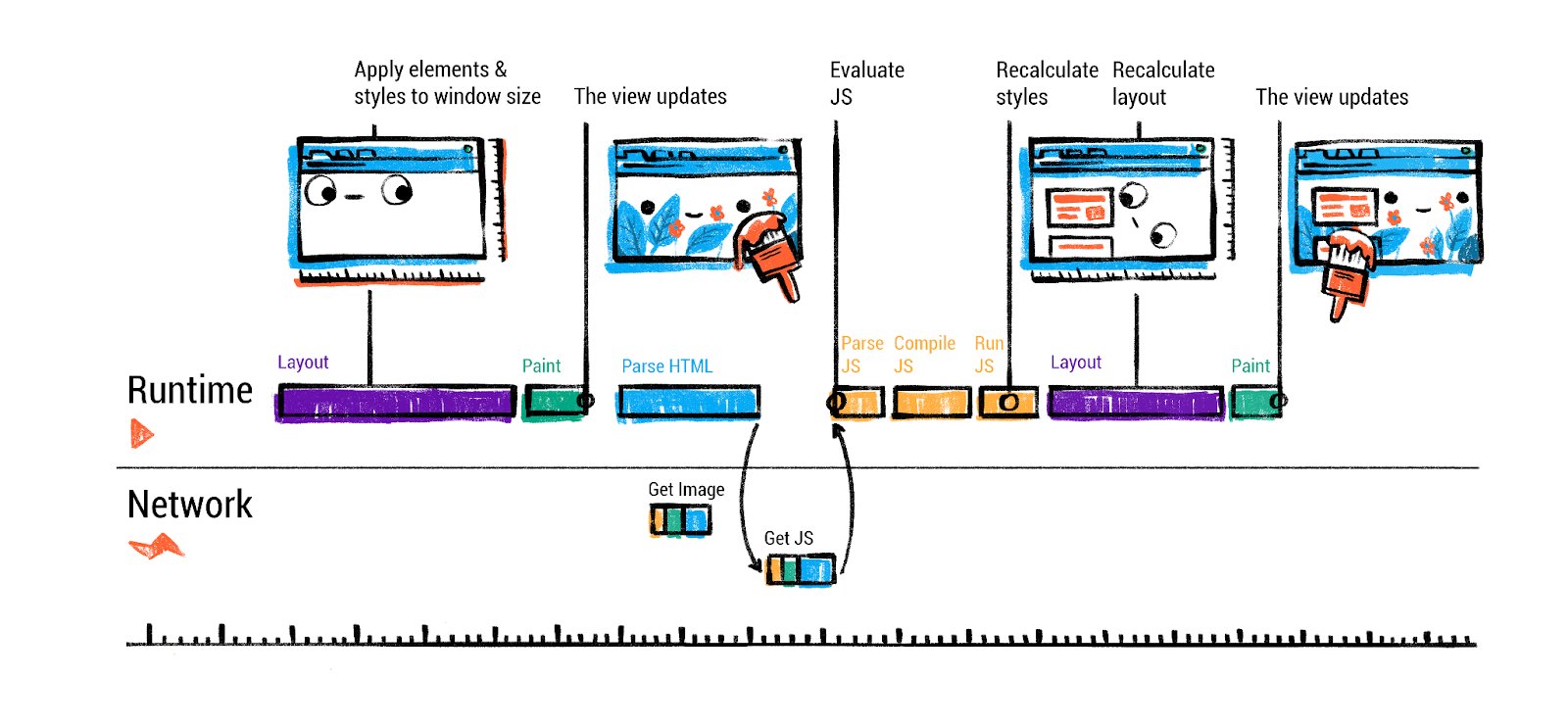
Handling <script> tags: If the HTML parser comes across a <script> tag, it pauses parsing and must execute the script before continuing (by default). This is because scripts can use document.write() or other DOM manipulation that can alter the page structure or content that’s still coming in. By executing immediately at that point, the browser preserves the correct order of operations relative to the HTML. The parser therefore hands off the script to the JavaScript engine for execution, and only when the script finishes (and any DOM changes it did are applied) can HTML parsing resume. This script execution blocking behavior is why including large <script> files in the head can slow down page rendering - the HTML parsing can’t continue until the script is downloaded and run.
处理 <script> 标签:如果 HTML 解析器遇到 <script> 标签,它会暂停解析并必须先执行脚本才能继续(默认行为)。这是因为脚本可以使用 document.write() 或其他 DOM 操作来改变仍在传入的页面结构或内容。通过在该点立即执行,浏览器保持了相对于 HTML 的正确操作顺序。因此,解析器将脚本交给 JavaScript 引擎执行,并且只有当脚本完成(并且它所做的任何 DOM 变更都已应用)后,HTML 解析才能恢复。这种脚本执行阻塞行为是为什么在 head 中包含大型 <script> 文件会减慢页面渲染速度的原因——HTML 解析必须等到脚本下载并运行后才能继续。
However, developers can modify this behavior with attributes: adding defer or async to a <script> tag (or using modern ES module scripts) changes how the browser handles it. With async, the script file is fetched in parallel and executed as soon as it’s ready, without pausing HTML parsing (the parse doesn’t wait, and the script doesn’t guarantee execution in original order relative to other async scripts). With defer, the script is fetched in parallel but execution is deferred until the HTML parsing is done (and will execute in the original order at that later time). In both cases, the parser isn’t blocked waiting on the script, which is generally better for performance. ES6 modules (using <script type=“module”>) are automatically deferred as well (and they can also use import statements - we’ll cover module loading separately). By using these techniques, the browser can continue building the DOM without long pauses, making pages load faster.
然而,开发者可以通过属性修改这种行为:给 <script> 标签添加 defer 或 async(或使用现代的 ES 模块脚本)会改变浏览器如何处理它。使用 async 时,脚本文件会并行获取,并在准备好后立即执行,而不会暂停 HTML 解析(解析不会等待,脚本也不保证按原始顺序与其他 async 脚本执行)。使用 defer 时,脚本会并行获取,但会延迟到 HTML 解析完成后再执行(并在稍后按原始顺序执行)。在这两种情况下,解析器都不会被脚本阻塞等待,这通常对性能更好。ES6 模块(使用 <script type=“module”>)也会自动延迟(并且它们还可以使用 import 语句——我们将在模块加载部分单独讨论)。通过使用这些技术,浏览器可以继续构建 DOM 而不会出现长时间的暂停,从而加快页面加载速度。
CSS Parsing and the CSSOM: Alongside HTML, CSS text must be parsed into a structure the browser can work with - often called the CSSOM (CSS Object Model). The CSSOM is essentially a representation of all the styles (rules, selectors, properties) that apply to the document. The browser’s CSS parser reads CSS files (or <style> blocks) and turns them into a list of CSS rules (and lots of bloom filters etc to speed up style resolution). Then, as the DOM is being constructed (or once both DOM and CSSOM are ready), the browser will compute the style for each DOM node. This step is usually called style resolution or style calculation. The browser combines the DOM and CSSOM to determine, for each element, which CSS rules apply and what the final computed styles are (after applying the cascade, inheritance, and default styles). The output is often conceptualized as an association of each DOM node with a computed style (the resolved, final CSS properties for that element, e.g. an element’s color, font, size, etc.).
CSS 解析和 CSSOM:与 HTML 一样,CSS 文本必须被解析成浏览器可以处理的结构——通常称为 CSSOM(CSS 对象模型)。CSSOM 本质上是应用于文档的所有样式(规则、选择器、属性)的表示。浏览器的 CSS 解析器读取 CSS 文件(或<style>块),并将它们转换为一组 CSS 规则(以及许多用于加速样式解析的 bloom 过滤器等)。然后,在 DOM 构建过程中(或当 DOM 和 CSSOM 都准备好后),浏览器将计算每个 DOM 节点的样式。这一步通常称为样式解析或样式计算。浏览器结合 DOM 和 CSSOM 来确定,对于每个元素,哪些 CSS 规则适用以及最终的计算样式是什么(在应用层叠、继承和默认样式之后)。输出通常被概念化为每个 DOM 节点与计算样式的关联(该元素的解析后的最终 CSS 属性,例如元素的 color、font、size 等)。
It’s worth noting that even without any author CSS, every element has default browser styles (the user-agent stylesheet). For example, a <h1> has a default font-size and margin in practically all browsers. The browser’s built-in style rules are applied with the lowest priority, and they ensure some reasonable default presentation. Developers can view computed styles in DevTools to see exactly what CSS properties an element ends up with. The style calculation step uses all applicable styles (user agent, user styles, author styles) to finalize each element’s styling.
值得注意的是,即使没有任何作者 CSS,每个元素都有默认的浏览器样式(用户代理样式表)。例如,在几乎所有浏览器中,一个 <h1> 元素都有默认的字体大小和边距。浏览器的内置样式规则具有最低的优先级,并确保合理的默认显示效果。开发者可以在开发者工具中查看计算后的样式,以了解元素最终具有哪些 CSS 属性。样式计算步骤使用所有适用的样式(用户代理、用户样式、作者样式)来最终确定每个元素的样式。
Render-blocking behavior: While HTML parsing can proceed without CSS fully loaded, there is a render-blocking relationship: browsers typically wait to perform the first render until CSS is loaded (for CSS in the <head>). This is because applying an incomplete stylesheet could flash unstyled content. In practice, if a <script> that is not marked async/defer appears before a CSS <link> in HTML, it will additionally wait for the CSS to load before executing the script (since scripts may query style information via DOM APIs). As a rule of thumb, put stylesheet links in the head (they block rendering but are needed early) and put non-critical or large scripts with defer/async or at the bottom so they don’t delay DOM parsing.
渲染阻塞行为:虽然 HTML 解析可以在 CSS 完全加载之前进行,但存在渲染阻塞关系:浏览器通常会等到 CSS 加载完成(对于<head>中的 CSS)才执行第一次渲染。这是因为应用不完整的样式表可能会导致未加样的内容闪烁。实际上,如果一个未标记为 async/defer 的<script>出现在 HTML 中的 CSS<link>之前,它将额外等待 CSS 加载才执行脚本(因为脚本可能会通过 DOM API 查询样式信息)。一般来说,将样式表链接放在<head>中(它们会阻塞渲染但需要尽早加载),并将非关键或大型脚本使用 defer/async 或放在底部,以避免延迟 DOM 解析。
Now the browser has (1) the DOM constructed from HTML, (2) the CSS rules parsed (CSSOM), and (3) the computed styles for each DOM node. These together form the basis for the next stage: layout. But before moving on, we should consider the JavaScript side in more detail - specifically how the JS engine (V8 in Chrome’s case) executes code. We touched on script blocking, but what happens when the JS runs? We’ll dedicate a later section to the internals of V8 and JS execution. For now, assume that as scripts run, they might modify the DOM or CSSOM (for example, calling document.createElement or setting element styles). The browser may have to respond to those changes by recalculating styles or layout as needed (which can incur performance costs if done repeatedly). The initial run of scripts during parsing often includes things like setting up event handlers, or maybe manipulating the DOM (e.g. templating). After that, the page is usually fully parsed and we move into layout and rendering.
现在浏览器已经构建了(1)从 HTML 生成的 DOM,(2)解析的 CSS 规则(CSSOM),以及(3)每个 DOM 节点的计算样式。这些共同构成了下一阶段:布局的基础。但在继续之前,我们应该更详细地考虑 JavaScript 方面——特别是 Chrome 中的 JS 引擎(V8)如何执行代码。我们提到了脚本阻塞,但当 JS 运行时会发生什么?我们将在后面的章节中专门讨论 V8 的内部机制和 JS 执行。目前,假设随着脚本的运行,它们可能会修改 DOM 或 CSSOM(例如,调用 document.createElement 或设置元素样式)。浏览器可能需要通过重新计算样式或布局来响应这些变化(如果反复这样做,可能会产生性能成本)。在解析期间脚本的初始运行通常包括设置事件处理程序,或者可能操作 DOM(例如,模板化)。之后,页面通常会被完全解析,然后我们进入布局和渲染阶段。
Styling and Layout
样式和布局
At this stage, the browser’s renderer process knows the structure of the DOM and each element’s computed style. The next question is: where do all these elements go on the screen? How big are they? This is the job of layout (also known as “reflow” or “layout calculation”). In this phase, the browser calculates the geometry of each element - their size and position - according to the CSS rules (flow, box model, flexbox or grid, etc.) and the DOM hierarchy.
在这个阶段,浏览器的渲染进程已经知道 DOM 的结构以及每个元素的已计算样式。下一个问题是:所有这些元素在屏幕上的位置在哪里?它们有多大?这是布局(也称为“重排”或“布局计算”)的工作。在这个阶段,浏览器根据 CSS 规则(如流、盒模型、Flexbox 或网格等)和 DOM 层次结构计算每个元素的几何形状——它们的大小和位置。
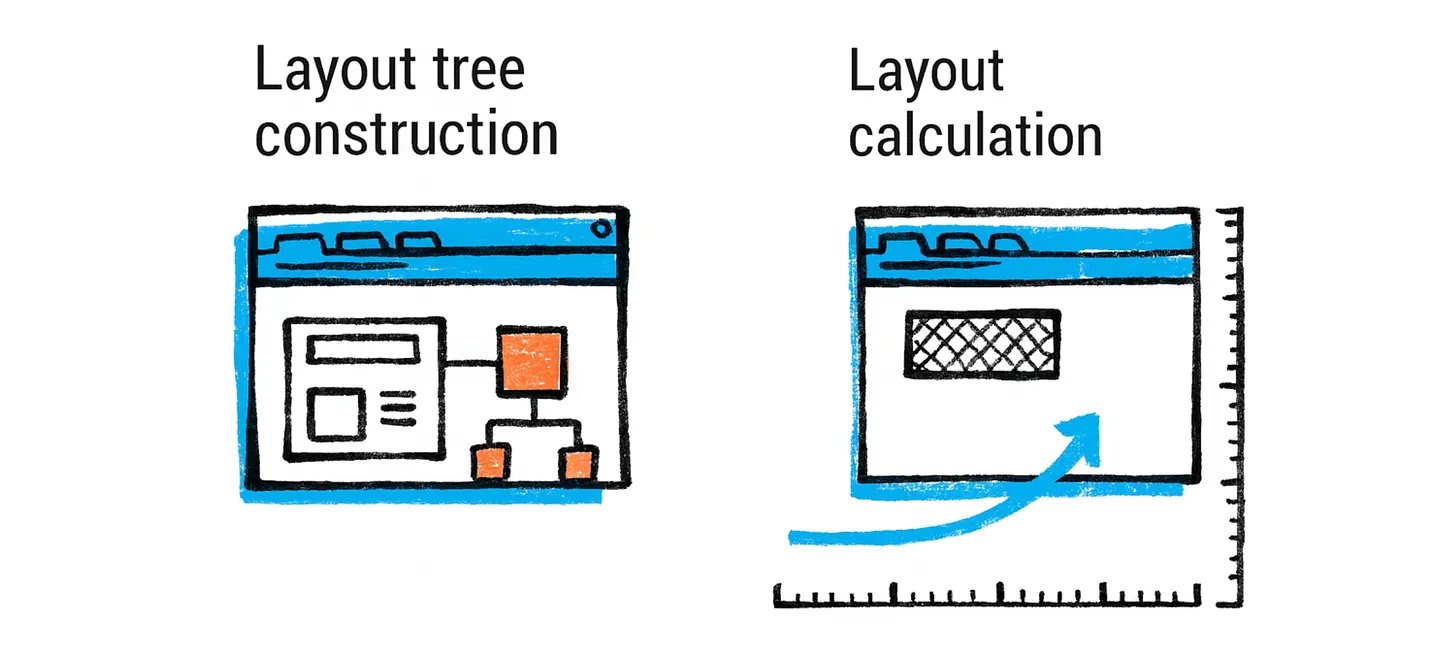
Layout tree construction: The browser walks the DOM tree and generates a layout tree (sometimes called the render tree or frame tree). The layout tree is similar to the DOM tree in structure, but it omits non-visual elements (e.g. script or meta tags don’t produce boxes) and may split some elements into multiple boxes if needed (for example, a single HTML element that is flowed across multiple lines might correspond to multiple layout boxes). Each node in the layout tree holds the computed style for that element and has information like the node’s content (text or image) and computed properties that affect layout (like width, height, padding, etc.).
布局树构建:浏览器遍历 DOM 树并生成布局树(有时也称为渲染树或帧树)。布局树在结构上与 DOM 树相似,但它会省略非视觉元素(例如,script 或 meta 标签不会生成框),并且如果需要,可能会将某些元素拆分为多个框(例如,一个跨越多行的 HTML 元素可能对应多个布局框)。布局树中的每个节点都包含该元素的已计算样式,并包含有关节点内容(文本或图像)以及影响布局的已计算属性(如宽度、高度、填充等)的信息。
During layout, the browser computes the exact position (x, y coordinates) and size (width, height) for each element’s box. This involves algorithms defined by CSS specifications: for example, in a normal document flow, block-level elements stack top-to-bottom, each taking full width by default, whereas inline elements flow within lines and cause line breaks as needed. Modern layout modes like flexbox or grid have their own algorithms. The engine has to consider font metrics to break lines (so text layout involves measuring text runs), and it must handle margins, padding, border, etc. There are many edge cases (e.g. margin collapsing rules, floats, absolutely positioned elements that are removed from flow, etc.), making layout a surprisingly complex process. Even a “simple” top-to-bottom layout has to figure out line breaks in text which depend on available width and font sizes. Browser engines have dedicated teams and many years of development to handle layout accurately and efficiently.
在布局过程中,浏览器会为每个元素的框计算确切的(x,y)坐标和大小(宽度,高度)。这涉及到由 CSS 规范定义的算法:例如,在一个普通文档流中,块级元素从上到下堆叠,每个元素默认占据完整宽度,而行内元素在行内流动并根据需要产生换行。现代布局模式如 flexbox 或 grid 有自己的算法。引擎必须考虑字体度量来断行(因此文本布局涉及测量文本行),并且必须处理边距、填充、边框等。有许多边缘情况(例如,边距折叠规则、浮动、从流中移除的绝对定位元素等),使得布局过程变得非常复杂。即使是“简单”的从上到下布局也必须确定文本的换行,这些换行取决于可用宽度和字体大小。浏览器引擎有专门的团队和多年的开发来准确高效地处理布局。
Some details about the layout tree:
关于布局树的细节:
-
Elements with display:none are omitted entirely from the layout tree (they don’t produce any box). In contrast, elements that are simply not visible (e.g. visibility:hidden) do get a layout box (taking up space), just not painted later.
具有 display:none 的元素完全从布局树中排除(它们不会产生任何框)。相比之下,仅仅不可见的元素(例如 visibility:hidden)确实会得到一个布局框(占用空间),只是稍后不会绘制。
-
Pseudo-elements like ::before or ::after that generate content are included in the layout tree (since they do have visual boxes).
像::before 或::after 这样的伪元素,它们生成内容,会被包含在布局树中(因为它们确实有视觉框)。
-
The layout tree nodes know their geometry. For example, a <p> element’s layout node will know its position relative to the viewport and its dimensions, and have children for each line or inline box inside it.
布局树节点知道它们的几何形状。例如,一个<p>元素的布局节点将知道它相对于视口的位置和尺寸,并且会为它内部的每一行或内联框有子节点。
Layout calculation: Layout is typically a recursive process. Starting from the root (the <html> element), the browser computes the size of the viewport (for <html>/<body>) and then lays out child elements within it, and so on. Many elements’ sizes depend on their children or parent (e.g. a container might expand to fit children, or a child might be 50% of its parent’s width). The layout algorithm often has to do multiple passes for things like floats or for certain complex interactions, but generally it proceeds in one direction (top-down) with possible backtracking if needed.
布局计算:布局通常是一个递归过程。从根节点(即 <html> 元素)开始,浏览器计算视口的尺寸(用于 <html>/<body>),然后在其中布局子元素,如此类推。许多元素的尺寸取决于它们的子元素或父元素(例如,一个容器可能会扩展以适应子元素,或者一个子元素可能是其父元素宽度的 50%)。布局算法通常需要多次遍历来处理浮动或某些复杂交互,但通常它按单向(自上而下)进行,如有必要可以进行回溯。
By the end of this stage, each element’s position and size on the page is known. We can now conceptually think of the page as a bunch of boxes (with text or images inside). But we still haven’t actually drawn anything on the screen yet - that’s the next step, painting.
到这个阶段结束时,每个元素在页面上的位置和大小都是已知的。我们现在可以概念性地将页面视为一堆盒子(里面包含文本或图像)。但我们还没有在屏幕上实际绘制任何东西——那将是下一步,绘制。
However, one key concept: layout can be an expensive operation, especially if done repeatedly. If JavaScript later changes the size of an element or adds content, it can force a relayout of some or all of the page. Developers often hear advice about avoiding layout thrashing (like reading layout info in JS right after modifying DOM, which can force synchronous recalculation). The browser tries to optimize by noting what parts of the layout tree are “dirty” and only recomputing those. But worst-case, changes high up in the DOM could require recalculating the entire layout for large pages. This is why costly style/layout operations should be minimized for better performance.
然而,有一个关键概念:布局可能是一个昂贵的操作,特别是如果反复执行。如果 JavaScript 后来改变了一个元素的大小或添加了内容,它可能会强制重新布局页面的某些部分或全部。开发者经常听到关于避免布局抖动(比如在修改 DOM 后立即在 JS 中读取布局信息,这可能会强制同步重新计算)的建议。浏览器尝试通过标记布局树中哪些部分是“脏的”来优化,只重新计算那些部分。但最坏的情况下,DOM 中高处的更改可能需要为大型页面重新计算整个布局。这就是为什么应该尽量减少昂贵的样式/布局操作以获得更好的性能。
Style and layout recap: To summarize, from HTML and CSS the browser builds:
样式和布局回顾:总而言之,从 HTML 和 CSS 浏览器构建:
-
DOM tree - structure and content
DOM 树 - 结构和内容
-
CSSOM - parsed CSS rulesCSSOM - 解析的 CSS 规则
-
Computed Styles - the result of matching CSS rules to each DOM node
计算样式 - 匹配 CSS 规则到每个 DOM 节点的结果
-
Layout tree - DOM tree filtered to visual elements, with geometry for each node
布局树 - 过滤 DOM 树以获取视觉元素,每个节点具有几何形状
Each stage builds on the last. If any stage changes (e.g. if a script alters the DOM or modifies a CSS property), the subsequent stages may need to update. For example, if you change a CSS class on an element, the browser may recalc style for that element (and children if inheritance changes), then might have to redo layout if that style change affects geometry (say display or size), then would have to repaint. This chain means layout and paint are dependent on up-to-date style, and so on. We’ll discuss performance implications of this in the DevTools section (as the browser provides tools to see when these steps occur and how long they take).
每个阶段都建立在上一阶段之上。如果任何阶段发生变化(例如,如果脚本更改了 DOM 或修改了 CSS 属性),后续阶段可能需要更新。例如,如果你更改了元素上的 CSS 类,浏览器可能会重新计算该元素(以及如果继承发生变化,子元素)的样式,然后可能需要重新布局(如果该样式更改影响几何形状,如 display 或 size),然后需要重绘。这个链式反应意味着布局和绘制依赖于最新的样式,等等。我们将在 DevTools 部分讨论这一点的影响(因为浏览器提供了工具来查看这些步骤何时发生以及耗时多久)。
With layout done, we move to the next major phase: painting.
布局完成后,我们进入下一个主要阶段:绘画。
Painting, Compositing, and GPU Rendering
绘制、合成和 GPU 渲染
Painting is the process of taking the structured layout information and actually producing pixels on the screen. In traditional terms, the browser would traverse the layout tree and issue drawing commands for each node (“draw background, draw text, draw image at these coordinates”). Modern browsers still conceptually do this, but they often split the work into multiple stages and leverage the GPU for efficiency.
绘画是将结构化的布局信息实际生成屏幕上的像素的过程。在传统术语中,浏览器会遍历布局树并为每个节点发出绘制命令(“绘制背景、绘制文本、在指定坐标绘制图像”)。现代浏览器在概念上仍然这样做,但它们通常将工作分成多个阶段并利用 GPU 来提高效率。
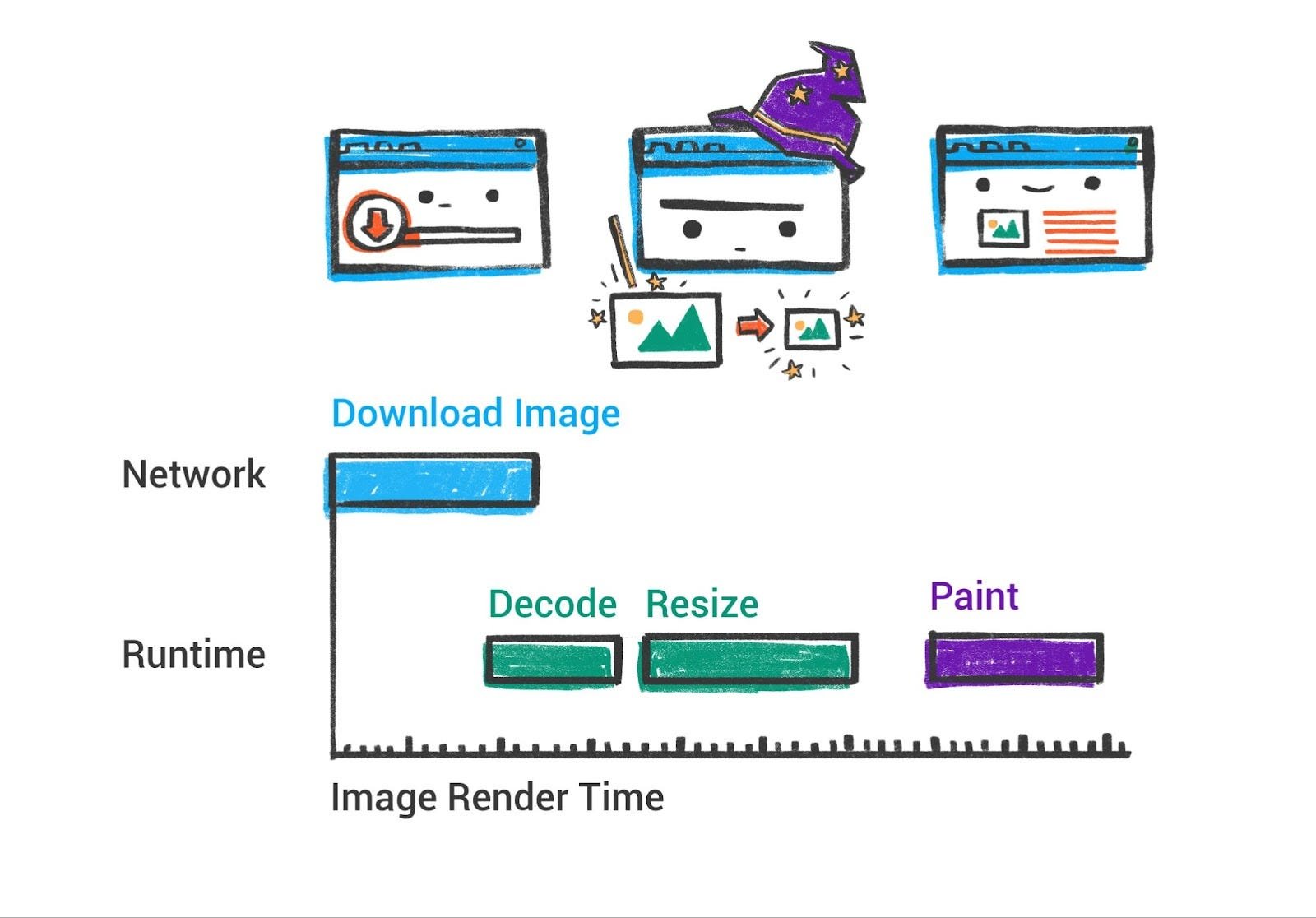
Painting / Rasterization: On the renderer’s main thread, after layout, Chrome generates paint records (or a display list) by walking the layout tree. This is basically a list of drawing operations with their coordinates, much like an artist planning how to paint the scene: e.g. “draw rect at (x,y) with width W and height H and fill color blue, then draw text ‘Hello’ at (x2,y2) with font XYZ, then draw an image at …” and so on. This list is in the correct z-index order (so that overlapping elements paint correctly). For example, if an element has a higher z-index, its paint commands will come later (on top of) lower z-index content. The browser must consider stacking contexts, transparency, etc. to get the right ordering.
绘画 / 光栅化:在渲染器的主线程上,布局完成后,Chrome 通过遍历布局树生成绘制记录(或显示列表)。这基本上是一系列包含坐标的绘制操作列表,就像艺术家规划如何绘制场景一样:例如“在 (x,y) 处绘制宽度为 W、高度为 H、填充颜色为蓝色的矩形,然后在 (x2,y2) 处绘制字体为 XYZ 的文本 ‘Hello’,然后绘制图像于 …”等等。这个列表按照正确的 z-index 顺序排列(以确保重叠元素正确绘制)。例如,如果一个元素的 z-index 更高,其绘制命令会出现在 z-index 较低的内容的上方。浏览器必须考虑堆叠上下文、透明度等因素以获得正确的顺序。
In the past, browsers might have simply drawn each element directly to the screen in order. But that approach can be inefficient if parts of the page change (you’d have to repaint everything). Modern browsers instead often record these drawing commands and then use a compositing step to assemble the final image, especially when using GPU acceleration.
过去,浏览器可能按顺序直接将每个元素绘制到屏幕上。但如果页面的部分内容发生变化(就需要重绘所有内容),这种方法的效率可能不高。现代浏览器通常会记录这些绘图指令,然后使用合成步骤来组装最终图像,尤其是在使用 GPU 加速时。
Layering and compositing: Compositing is an optimization where the page is split into several layers that can be handled independently. For example, a positioned element with a CSS transform or an animation might get its own layer. Layers are like separate “scratch canvases” - the browser can rasterize (draw) each layer separately, and then the compositor can blend them together on the screen, often using the GPU.
叠加和合成:合成是一种优化,将页面拆分为多个可以独立处理的层。例如,具有 CSS 变换或动画的定位元素可能会获得自己的层。层就像独立的“草稿画布”——浏览器可以单独光栅化(绘制)每个层,然后合成器可以在屏幕上将它们混合在一起,通常使用 GPU。
In Chromium’s pipeline, after paint records are generated, there’s a step to build the layer tree (this corresponds to which elements are on which layer). Some layers are created automatically (e.g. a video element, or a canvas, or elements with certain CSS will be promoted to layers), and developers can hint by using will-change or CSS properties like transform to get a layer. The reason layers are helpful is that movement or opacity changes on a layer can be composited (i.e. just that layer re-rendered or moved) without re-painting the whole page. Too many layers, however, can be memory-heavy and add overhead, so browsers choose carefully.
在 Chromium 的流程中,生成绘制记录后,有一个步骤用于构建层树(这对应于哪些元素位于哪些层上)。某些层会自动创建(例如视频元素、画布或具有特定 CSS 的元素会被提升为层),开发者可以通过使用 will-change 或 transform 等 CSS 属性来提示创建层。层之所以有帮助,是因为层上的移动或透明度变化可以进行合成(即仅重新渲染或移动该层),而无需重新绘制整个页面。然而,过多的层可能会消耗大量内存并增加开销,因此浏览器会谨慎选择。
After determining layers, Chrome’s main thread hands off to the compositor thread. The compositor thread runs in the renderer process but separate from the main thread (so it can keep working even if the main JS thread is busy, which is great for smooth scrolling and animations). The compositor thread’s job is to take the layers, rasterize them (convert the drawings into actual pixel bitmaps), and compose them into frames.
在确定图层后,Chrome 的主线程将任务交给合成线程。合成线程在渲染进程中运行,但与主线程分离(因此即使主 JS 线程繁忙,它也能继续工作,这对平滑滚动和动画非常有利)。合成线程的任务是获取图层,将它们光栅化(将绘图转换为实际的像素位图),并将它们合成帧。
Rasterization with GPU assistance: Raster work can also be distributed. In Chrome, the compositor thread breaks layers into smaller tiles (think 256x256 or 512x512 pixel chunks, which are often larger when GPU raster is on, almost always). It then dispatches these to several raster worker threads (which may even run across multiple CPU cores) for concurrent rasterization. Each raster worker takes a tile - essentially a list of drawing commands for that region of a layer - and produces a bitmap (pixel data). Importantly, Skia (Chrome’s graphics library) can use the CPU or GPU to rasterize; in Chrome’s case, these raster threads typically use CPU to render the pixels and then upload them to GPU memory. Firefox’s newer WebRender takes a different approach we’ll mention later. The rasterized tiles are stored in GPU memory as textures. Once all needed tiles are drawn, the compositor thread has essentially a set of textured layers ready.
使用 GPU 辅助的栅格化:栅格工作也可以进行分布式处理。在 Chrome 中,合成线程将图层分解成更小的瓦片(想想 256x256 或 512x512 像素的块,当 GPU 栅格开启时,这些块通常更大,几乎总是如此)。然后它将这些瓦片分派给多个栅格工作线程(这些线程甚至可能跨越多个 CPU 核心运行)以进行并发栅格化。每个栅格工作线程获取一个瓦片——本质上是一个用于该图层区域的绘图命令列表——并生成位图(像素数据)。重要的是,Skia(Chrome 的图形库)可以使用 CPU 或 GPU 进行栅格化;在 Chrome 的情况下,这些栅格线程通常使用 CPU 来渲染像素,然后将它们上传到 GPU 内存。Firefox 的新版 WebRender 采用我们稍后提到的不同方法。栅格化的瓦片作为纹理存储在 GPU 内存中。一旦所有需要的瓦片都绘制完成,合成线程就基本上有一套带纹理的图层准备好了。
The compositor then assembles a compositor frame - basically a message to the browser process that includes all the quads (tiles of layers) that make up the screen, their positions, etc. This compositor frame is submitted via IPC back to the browser process, where ultimately the browser’s GPU process (a separate process in Chrome for accessing GPU) will take these and display them. The browser process’s own UI (like the tab bar) is also drawn via compositor frames, and they all get mixed in the final step. The GPU process receives the frames, and uses the GPU (via OpenGL/DirectX/Metal etc.) to composite them - basically drawing each texture at the right place on screen, applying transforms, etc. very fast. The result is the final image you see displayed.
合成器随后组装一个合成器帧——基本上是一个包含构成屏幕的所有四边形(层块)及其位置等信息的消息给浏览器进程。这个合成器帧通过 IPC 回传给浏览器进程,最终浏览器 GPU 进程(Chrome 中访问 GPU 的独立进程)会获取这些信息并显示它们。浏览器进程自身的 UI(如标签栏)也是通过合成器帧绘制的,它们在最后一步中混合在一起。GPU 进程接收这些帧,并使用 GPU(通过 OpenGL/DirectX/Metal 等)将它们合成——基本上是在屏幕的正确位置绘制每个纹理,应用变换等,非常快。最终结果是你看到的显示图像。
The advantage of this pipeline is apparent when you scroll or animate. For example, scrolling a page mostly just changes the viewport on a larger page texture. The compositor can just shift the layer positions and ask the GPU to redraw the new portion coming into view, without the main thread having to repaint everything. If an animation is just a transform (say moving an element that is its own layer), the compositor thread can update that element’s position each frame and produce new frames without involving the main thread or re-running style and layout. This is why animations that are “compositing-only” (changing transform or opacity, which don’t trigger layout) are recommended for better performance - they can run at 60 FPS smoothly even if the main thread is busy. In contrast, animating something like height or background-color might force re-layout or re-paint each frame, which janks if the main thread can’t keep up.
这种管道在滚动或动画时的优势很明显。例如,滚动页面通常只是在一个较大的页面纹理上改变视口。合成器只需移动图层位置,并要求 GPU 重新绘制进入视口的 新部分,而无需主线程重新绘制所有内容。如果动画只是一个变换(比如移动一个自 身就是图层的元素),合成器线程可以每帧更新该元素的位置,并生成新帧,而无需涉及主线程或重新运行样式和布局。这就是为什么建议使用“仅合成”的动画(改变变换或透明度,这些不会触发布局)以获得更好的性能——即使主线程繁忙,它们也能以 60 FPS 流畅运行。相比之下,动画化高度或背景颜色可能会迫使每帧重新布局或重新绘制,如果主线程跟不上速度,就会卡顿。
To put it succinctly, Chrome’s rendering pipeline is: DOM → style → layout → paint (record display items) → layerize → raster (tiles) → composite (GPU). Firefox’s pipeline is conceptually similar up to the display list stage, but with WebRender it skips explicit layer construction and instead sends a display list to the GPU process, which then handles almost all drawing using GPU shaders (more on this in the comparison section). WebKit (Safari) also uses a multi-threaded compositor and GPU rendering via “CALayers” on macOS. All modern engines thus take advantage of GPUs for rendering, especially for compositing and rasterizing graphics-intensive parts, to achieve high frame rates and offload work from the CPU.
简而言之,Chrome 的渲染流程是:DOM → 样式 → 布局 → 绘制(记录显示项)→ 分层 → 光栅化(瓦片)→ 合成(GPU)。Firefox 的流程在显示列表阶段之前概念上相似,但使用 WebRender 时会跳过显式的层构建,而是将显示列表发送到 GPU 进程,该进程随后几乎使用 GPU 着色器处理所有绘图(比较部分将详细说明)。WebKit(Safari)在 macOS 上通过“CALayers”使用多线程合成器和 GPU 渲染。因此,所有现代引擎都利用 GPU 进行渲染,特别是在合成和光栅化图形密集型部分,以实现高帧率并将工作从 CPU 卸载。
Before moving on, let’s discuss the GPU’s role in more detail. In Chromium, the GPU process is a separate process whose job is to interface with the graphics hardware. It receives drawing commands (mostly high-level, like “draw these textures at these coords”) from all renderer compositors and also the browser UI. It then translates that into actual GPU API calls. By isolating it in a process, a buggy GPU driver that crashes won’t take down the whole browser - only the GPU process, which can be restarted. Also, it provides a sandbox boundary (since GPUs process potentially untrusted content like canvas drawing, WebGL, etc. there have been security bugs in drivers - running them out-of-process mitigates risk).
在继续之前,让我们更详细地讨论 GPU 的作用。在 Chromium 中,GPU 进程是一个单独的进程,其工作是与图形硬件交互。它从所有渲染器合成器和浏览器 UI 接收绘图命令(主要是高级命令,如“在这些坐标处绘制这些纹理”),然后将这些命令转换为实际的 GPU API 调用。通过将其隔离在一个进程中,有问题的 GPU 驱动程序崩溃不会使整个浏览器崩溃——只会使 GPU 进程崩溃,该进程可以重新启动。此外,它提供了一个沙盒边界(由于 GPU 会处理潜在的不可信内容,如画布绘制、WebGL 等,驱动程序中存在安全漏洞——以进程外方式运行它们可以降低风险)。
The result of the compositing is finally sent to the display (the OS window or context the browser is running in). For each animation frame (target 60fps or 16.7ms per frame for smooth results), the compositor aims to produce a frame. If the main thread is busy (say JavaScript took a long time), the compositor might skip frames or can’t update, leading to visible jank. Developer tools can show dropped frames in the performance timeline. Techniques like requestAnimationFrame align JS updates to frame boundaries to help with smooth rendering.
合成结果最终发送到显示(操作系统窗口或浏览器运行的上下文)。对于每个动画帧(目标为 60fps 或每帧 16.7ms 以获得平滑效果),合成器旨在生成一帧。如果主线程繁忙(比如 JavaScript 执行时间过长),合成器可能会跳过帧或无法更新,导致可见的卡顿。开发者工具可以在性能时间轴上显示丢失的帧。像 requestAnimationFrame 这样的技术可以将 JS 更新与帧边界对齐,以帮助实现平滑渲染。
In summary, the browser’s rendering engine carefully breaks down the page content and styles into a set of geometry (layout) and drawing instructions, then uses layers and GPU compositing to efficiently turn that into the pixels you see. This complex pipeline is what enables the rich graphics and animations on the web to run at interactive frame rates. Next, we will peek into the JavaScript engine to understand how the browser executes scripts (which we’ve so far treated as a black box).
总之,浏览器的渲染引擎仔细地将页面内容和样式分解为一系列几何(布局)和绘图指令,然后使用层和 GPU 合成来高效地将这些转换为您看到的像素。正是这个复杂的管道使得网页上的丰富图形和动画能够以交互式帧率运行。接下来,我们将深入了解 JavaScript 引擎,以了解浏览器如何执行脚本(到目前为止,我们一直将其视为一个黑盒)。
Inside the JavaScript Engine (V8)
JavaScript 引擎(V8)内部
JavaScript drives the interactive behavior of web pages. In Chromium browsers, the V8 engine executes JavaScript (and WebAssembly). Understanding V8’s workings can help developers write performant JS. While an exhaustive deep-dive would be book-length, we’ll focus on the key stages of the JS execution pipeline: parsing/compiling the code, executing it, and managing memory (garbage collection). We’ll also note how V8 handles modern features like Just-In-Time (JIT) compilation tiers and ES modules.Java
Script 驱动着网页的交互行为。在 Chromium 浏览器中,V8 引擎执行 JavaScript(以及 WebAssembly)。了解 V8 的工作原理可以帮助开发者编写高性能的 JS。虽然深入的探讨会像写书一样长,但我们将专注于 JS 执行流程的关键阶段:解析/编译代码、执行代码以及管理内存(垃圾回收)。我们还将指出 V8 如何处理现代特性,如即时编译(JIT)编译层级和 ES 模块。
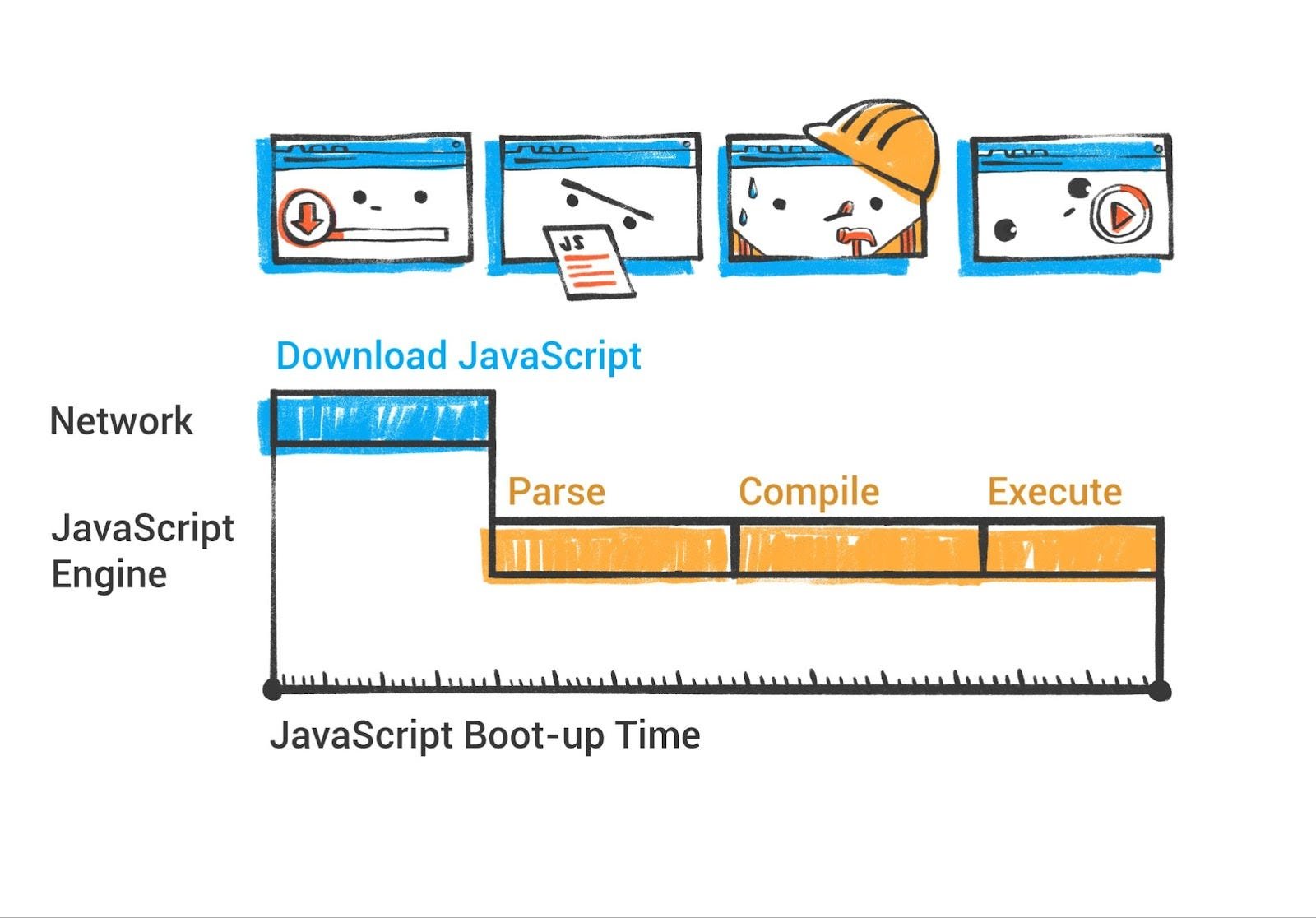
Modern V8 Parsing and Compilation Pipeline
现代 V8 解析和编译流程
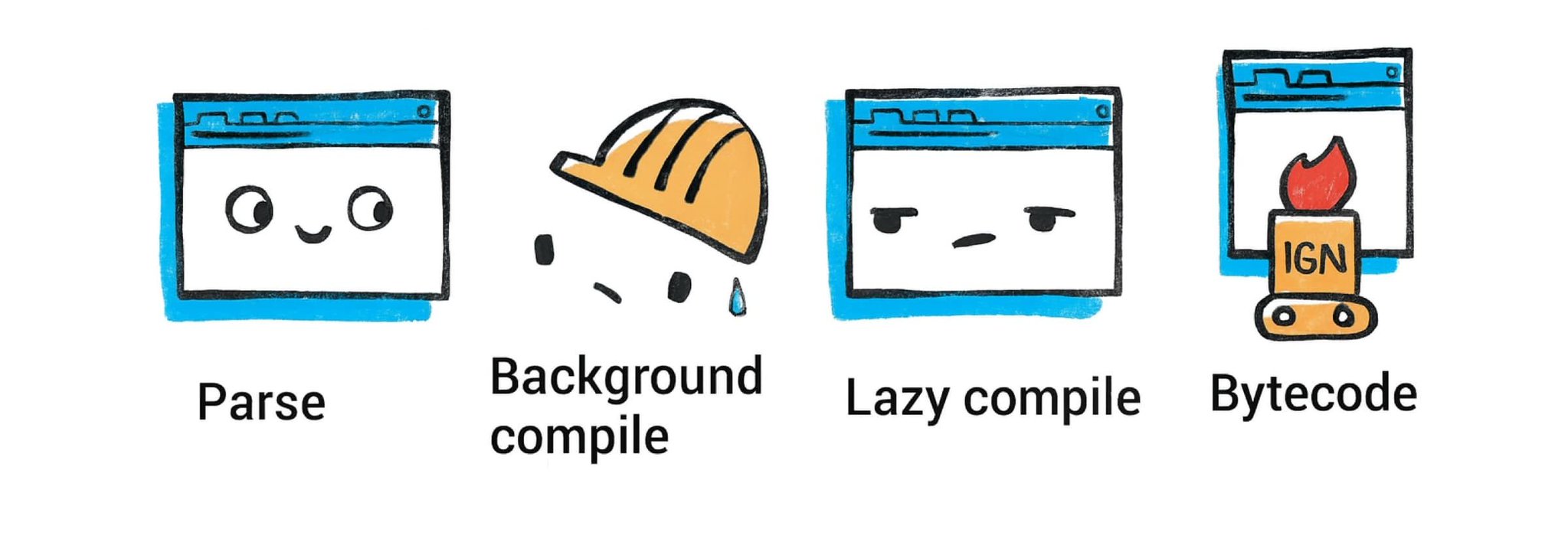
Background compilation: Starting with Chrome 66, V8 compiles JavaScript source code on a background thread, reducing the amount of time spent compiling on the main thread by between 5% to 20% on typical websites. Since version 41, Chrome has supported parsing of JavaScript source files on a background thread via V8’s StreamedSource API. V8 can start parsing JavaScript source code as soon as the first chunk is downloaded from the network and continue parsing in parallel while streaming the file. Almost all script compilation occurs on background threads, with only short AST internalization and bytecode finalization steps happening on the main thread just before script execution. Currently, top-level script code and immediately invoked function expressions are compiled on background threads, while inner functions are still compiled lazily on the main thread when first executed.
背景编译:从 Chrome 66 开始,V8 在后台线程编译 JavaScript 源代码,在典型网站上减少了在主线程上编译的时间,减少了 5%到 20%。自版本 41 以来,Chrome 通过 V8 的 StreamedSource API 支持在后台线程上解析 JavaScript 源文件。V8 可以在从网络下载第一个数据块后立即开始解析 JavaScript 源代码,并在流式传输文件时并行继续解析。几乎所有脚本编译都在后台线程上发生,只有在脚本执行前,主线程上才会进行短暂的 AST 内部化和字节码最终化步骤。目前,顶层脚本代码和立即调用的函数表达式在后台线程上编译,而内部函数在首次执行时仍然在主线程上懒编译。
Parsing and bytecode: When a <script> is encountered (either during HTML parse or loaded later), V8 first parses the JavaScript source code. This produces an Abstract Syntax Tree (AST) representation of the code. The preparser is a copy of the parser that does the bare minimum needed to skip over functions. It verifies that functions are syntactically valid and produces all information needed for outer functions to be compiled correctly. When a preparsed function is later called, it is fully parsed and compiled on-demand.
解析和字节码:当遇到 <script> 元素时(无论是在 HTML 解析过程中还是在加载后),V8 首先解析 JavaScript 源代码。这会生成代码的抽象语法树(AST)表示。预解析器是解析器的副本,它执行最基本的工作以跳过函数。它验证函数在语法上是否有效,并生成所有必要的信息,以便外部函数能够正确编译。当调用预解析的函数时,它会在需要时完全解析和编译。
Rather than interpreting directly from the AST, V8 uses a bytecode interpreter called Ignition (introduced in 2016). Ignition compiles the JavaScript into a compact bytecode format, which is essentially a sequence of instructions for a virtual machine. This initial compilation is quite fast and the bytecode is fairly low-level (Ignition is a register-based VM). The goal is to start executing the code quickly with minimal upfront cost (important for page load times).
与其直接从 AST 解释,V8 使用名为 Ignition(2016 年引入)的字节码解释器。Ignition 将 JavaScript 编译成紧凑的字节码格式,本质上是一个虚拟机的指令序列。这次初始编译非常快,字节码相当低级(Ignition 是一个基于寄存器的虚拟机)。目标是快速开始执行代码,同时最小化前期成本(这对页面加载时间很重要)。
AST internalization process: AST internalization involves allocating literal objects (strings, numbers, object-literal boilerplate) on the V8 heap for use by generated bytecode. To enable background compilation, this process was moved later in the compilation pipeline, after bytecode compilation, requiring modifications to access raw literal values embedded in the AST instead of internalized on-heap values.
AST 内部化过程:AST 内部化涉及在 V8 堆上分配字面量对象(字符串、数字、对象字面量样板)供生成的字节码使用。为了启用后台编译,这个过程被移到了编译管道的后期,在字节码编译之后,这需要修改以访问嵌入在 AST 中的原始字面量值,而不是堆上的内部化值。
Explicit Compile Hints: V8 has introduced a new feature called “Explicit Compile Hints” which allows developers to instruct V8 to parse and compile code immediately on load through eager compilation. Files with this hint are compiled on background threads, whereas deferred compilation happens on the main thread. Experiments with popular web pages showed performance improvements in 17 out of 20 cases, with an average 630ms reduction in foreground parse and compile times. Developers can add explicit compile hints to JavaScript files using special comments to enable eager compilation on background threads for critical code paths.
显式编译提示:V8 引入了一项名为“显式编译提示”的新功能,允许开发者指示 V8 通过即时编译(eager compilation)在加载时立即解析和编译代码。带有此提示的文件在后台线程上编译,而延迟编译则在主线程上发生。对流行网页的实验表明,在 20 个案例中的 17 个中观察到性能提升,前台解析和编译时间平均减少了 630 毫秒。开发者可以使用特殊注释向 JavaScript 文件添加显式编译提示,以在后台线程上为关键代码路径启用即时编译。
Scanner and parser optimizations: V8’s scanner has been significantly optimized, resulting in improvements across the board: single token scanning improved by roughly 1.4×, string scanning by 1.3×, multiline comment scanning by 2.1×, and identifier scanning by 1.2-1.5× depending on identifier length.
扫描器和解析器优化:V8 的扫描器经过显著优化,整体性能得到提升:单符号扫描速度提升了约 1.4 倍,字符串扫描速度提升了 1.3 倍,多行注释扫描速度提升了 2.1 倍,标识符扫描速度根据标识符长度在 1.2-1.5 倍之间提升。
When the script runs, Ignition interprets the bytecode, executing the program. Interpretation is generally slower than optimized machine code, but it allows the engine to start running and also collect profiling information about the code’s behavior. As the code runs, V8 gathers data on how it’s being used: types of variables, which functions are called frequently, etc. This information will be used to make the code run faster in subsequent steps.
当脚本运行时,Ignition 解释字节码,执行程序。解释通常比优化后的机器代码慢,但它允许引擎开始运行并收集关于代码行为的分析信息。随着代码的运行,V8 收集关于其使用情况的数据:变量的类型、哪些函数被频繁调用等。这些信息将在后续步骤中用于使代码运行得更快。
**JIT Compilation Tiers
JIT 编译层级**
V8 doesn’t stop at interpretation. It employs multiple tiers of Just-In-Time compilers to accelerate hot code. The idea is to spend more compilation effort on code that runs a lot, to make it faster, while not wasting time optimizing code that runs only once.
V8 并非仅限于解释执行。它采用多层即时编译器来加速热点代码。其理念是在运行频率高的代码上投入更多编译资源,使其运行更快,同时避免在仅运行一次的代码上浪费优化时间。
- Ignition (interpreting the bytecode).
点火(解释字节码)。 2. Sparkplug: V8’s baseline JIT called Sparkplug (launched around 2021). Sparkplug takes the bytecode and compiles it to machine code quickly, without heavy optimizations. This yields native code that is faster than interpretation but Sparkplug doesn’t do deep analysis - it’s meant to be almost as quick as the interpreter to start, but produce code that runs a bit faster.
火花塞:V8 的基准 JIT 称为火花塞(约 2021 年推出)。火花塞将字节码快速编译成机器码,但不会进行大量优化。这会产生比解释执行更快的原生代码,但火花塞不会进行深度分析——它的设计目标是几乎与解释器一样快地启动,但生成运行速度稍快的代码。 3. Maglev: In 2023, V8 introduced Maglev, a mid-tier optimizing compiler that is now actively deployed. Maglev generates code nearly 20 times slower than Sparkplug but 10 to 100 times faster than TurboFan, effectively bridging the gap for functions that are moderately hot but not hot enough for TurboFan optimization. Maglev comes into play for functions that are somewhat hot but not hot enough for TurboFan, or when TurboFan’s compilation would be too costly. As of Chrome M117, Maglev can handle many cases, resulting in faster startup for web apps that spend time in “warm” code (not cold, not super hot) by bridging the gap between baseline and highest-tier JIT.
磁悬浮:2023 年,V8 推出了磁悬浮,这是一种中端优化编译器,目前已被积极部署。磁悬浮生成的代码比 Sparkplug 慢近 20 倍,但比 TurboFan 快 10 到 100 倍,有效地弥补了对于中等热度但不足以进行 TurboFan 优化的函数的差距。磁悬浮适用于热度稍高但不足以进行 TurboFan 优化的函数,或者当 TurboFan 的编译成本过高时。截至 Chrome M117,磁悬浮可以处理许多情况,通过弥合基线和最高级 JIT 之间的差距,使在“温热”代码(非冷、非极热)中花费时间的 Web 应用启动更快。 4. TurboFan: As functions or loops get executed many times, V8 will engage its most powerful optimizing compiler. TurboFan takes the code and uses the collected type feedback to generate highly optimized machine code, applying advanced optimizations (inlining functions, eliding bounds checks, etc.). Note: as of 2025, V8 has been incrementally replacing TurboFan’s internal “Sea of Nodes” intermediate representation with a CFG-based IR called Turboshaft. The entire JavaScript backend of TurboFan now uses Turboshaft, and a further project (Turbolev) is underway to use Maglev’s IR as the frontend, replacing TurboFan’s front-end entirely. This optimized code can run much faster if the assumptions hold.
TurboFan:当函数或循环被多次执行时,V8 将启用其最强大的优化编译器。TurboFan 将代码处理并使用收集的类型反馈来生成高度优化的机器代码,应用高级优化(如函数内联、省略边界检查等)。注意:截至 2025 年,V8 已逐步用基于 CFG 的 IR(称为 Turboshaft)来替换 TurboFan 内部的“节点海洋”中间表示。TurboFan 的整个 JavaScript 后端现在使用 Turboshaft,并且还有一个进一步的项目(Turbolev)正在开发中,使用 Maglev 的 IR 作为前端,完全替换 TurboFan 的前端。如果假设成立,这段优化代码可以运行得更快。
So V8 now effectively has four execution tiers: Ignition interpreter, Sparkplug baseline JIT, Maglev optimizing JIT, and TurboFan optimizing JIT (whose backend is progressively being replaced by Turboshaft). This is analogous to how Java’s HotSpot VM has multiple JIT levels (C1 and C2). The engine can dynamically decide which functions to optimize and when, based on execution profiles. If a function suddenly is called a million times, it will likely end up TurboFan-optimized for maximum speed.
所以现在 V8 实际上有四个执行层级:Ignition 解释器、Sparkplug 基线 JIT、Maglev 优化 JIT 和 TurboFan 优化 JIT(其后端正逐步被 Turboshaft 取代)。这类似于 Java 的 HotSpot VM 有多个 JIT 层级(C1 和 C2)。引擎可以根据执行分析动态决定要优化的函数及其时间。如果一个函数突然被调用一百万次,它很可能最终会被 TurboFan 优化以实现最大速度。
Intel has also developed Profile-Guided Tiering that enhances V8’s efficiency, leading to approximately 5% improvement on Speedometer 3 benchmarks. Recent V8 updates include static roots optimization, which allows accurate prediction of memory addresses at compile time for commonly used objects, significantly improving access speed.
英特尔还开发了基于分析的层级优化技术,提升了 V8 的效率,在 Speedometer 3 基准测试中约提升了 5%。最近的 V8 更新包括静态根优化,它允许在编译时准确预测常用对象的内存地址,显著提高了访问速度。
One challenge with JIT optimization is that JavaScript is dynamically typed. V8 might optimize code under certain assumptions (e.g. this variable is always an integer). If a later call violates those assumptions (say the variable becomes a string), the optimized code is invalid. V8 then performs a deoptimization: it falls back to a less optimized version (or re-generates code with new assumptions). This mechanism relies on “inline caches” and type feedback to quickly adapt. The existence of deopt means sometimes peak performance isn’t sustained if your code has unpredictable types, but generally V8 tries to handle typical patterns (like a function consistently being passed the same type of object).
JIT 优化中的一个挑战是 JavaScript 是动态类型的。V8 可能会在某些假设下优化代码(例如,这个变量始终是整数)。如果后续调用违反了这些假设(比如变量变成了字符串),那么优化的代码就无效了。V8 随后执行去优化:它会回退到不太优化的版本(或者用新的假设重新生成代码)。这种机制依赖于“内联缓存”和类型反馈来快速适应。去优化的存在意味着如果您的代码具有不可预测的类型,有时峰值性能可能无法持续,但通常 V8 会尝试处理典型模式(比如一个函数始终传递相同类型的对象)。
Bytecode Flushing and Memory Management
字节码刷新和内存管理
V8 implements bytecode flushing where if a function remains unused after multiple garbage collections, its bytecode will be reclaimed. When executed again, the parser uses previously stored results to regenerate the bytecode more quickly. This mechanism is crucial for memory management but can lead to parsing inconsistencies in edge cases.
V8 实现了字节码刷新机制,如果一个函数在多次垃圾回收后仍然未被使用,它的字节码将被回收。再次执行时,解析器会使用之前存储的结果来更快地重新生成字节码。这个机制对于内存管理至关重要,但在边缘情况下可能导致解析不一致。
Memory Management (Garbage Collection): V8 automatically manages memory for JS objects using a garbage collector. Over the years, V8’s GC has evolved into what’s known as the Orinoco GC, which is a generational, incremental, and concurrent garbage collector. Key points:
内存管理(垃圾回收):V8 使用垃圾回收器自动管理 JS 对象的内存。多年来,V8 的 GC 已经演变成所谓的 Orinoco GC,这是一个代际式、增量式和并发式的垃圾回收器。要点:
-
Generational: V8 segregates objects by age. New objects are allocated in the young generation (or “nursery”). These are collected frequently with a very fast scavenging algorithm (copying live objects to a new space and reclaiming the rest). Objects that survive enough cycles get promoted to the old generation.
世代:V8 按年龄隔离对象。新对象分配在年轻代(或“育婴室”)。它们通过非常快的回收算法频繁回收(将存活对象复制到新空间并回收其余部分)。存活足够周期的对象会被提升到老年代。
-
Mark-and-sweep/compact: For the old generation, V8 uses a mark-and-sweep collector with compaction. This means it will occasionally stop the world (stop JS execution briefly), mark all reachable objects (tracing from roots like the global object), then sweep to reclaim memory from unreferenced objects. It may also compact memory (moving objects to reduce fragmentation). However, Orinoco has made much of the marking concurrent - it can do a lot of the marking on a background thread while JS is still running, to minimize pause times.
标记和清除/压缩:对于老年代,V8 使用带有压缩的标记和清除收集器。这意味着它偶尔会暂停世界(短暂停止 JS 执行),标记所有可达对象(从根对象如全局对象开始追踪),然后清除以回收未引用对象的内存。它还可能压缩内存(移动对象以减少碎片)。然而,Orinoco 大部分标记工作都实现了并发——它可以在 JS 仍在运行时在后台线程上执行大量标记工作,以最小化暂停时间。
-
Incremental GC: V8 performs garbage collection in small slices rather than one big pause when possible. This incremental approach spreads work out to avoid jank. For example, it can interleave a bit of marking work between script executions, using idle time.
增量式 GC:V8 在可能的情况下,将垃圾回收分成小片进行,而不是一次性进行大暂停。这种增量式方法将工作分散开,以避免卡顿。例如,它可以在脚本执行之间插入一些标记工作,利用空闲时间。
-
Parallel GC: On multi-core machines, V8 can perform parts of GC (like marking or sweeping) in parallel threads as well.
并行 GC:在多核机器上,V8 也可以使用并行线程执行 GC 的部分任务(如标记或清理)。
The net effect is that the V8 team has managed to drastically reduce GC pause times over the years, making garbage collection mostly unnoticeable even in large applications. Minor GCs (new object scavenge) usually happen very fast. Major GCs (old gen) are rarer and mostly concurrent now. If you open Chrome’s Task Manager or DevTools Memory panel, you might see V8’s heap broken into “Young space” and “Old space” reflecting this generational design.
V8 团队多年来成功大幅减少了 GC 暂停时间,使得垃圾回收即使在大型应用程序中也几乎不被察觉。Minor GC(新对象回收)通常非常快。Major GC(老年代)现在更少发生,并且大多是并发执行的。如果你打开 Chrome 的任务管理器或 DevTools 内存面板,可能会看到 V8 的堆被划分为“年轻代空间”和“老年代空间”,反映了这种分代设计。
For developers, this means manual memory management isn’t needed, but you should still be mindful: e.g. avoid creating tons of short-lived objects in tight loops (though V8 is quite good at handling short-lived objects) and be aware that holding onto large data structures will keep them around in memory. Tools like DevTools can force a garbage collection or record memory profiles to see what is using memory.
对于开发者来说,这意味着不需要手动内存管理,但你仍需注意:例如,避免在紧密循环中创建大量短期对象(尽管 V8 在处理短期对象方面相当不错),并要注意持有大型数据结构会使它们保留在内存中。像 DevTools 这样的工具可以强制进行垃圾回收或记录内存配置文件,以查看内存使用情况。
V8 and Web APIs: It’s worth mentioning that V8 covers the core JavaScript language and runtime (execution, standard JS objects, etc.), but many “browser APIs” (like DOM methods, alert(), network XHR/fetch, etc.) are not part of V8 itself. Those are provided by the browser and are exposed to JS via bindings. For instance, when you call document.querySelector, under the hood it enters the engine’s binding to the C++ DOM implementation. V8 handles calling into C++ and getting results back, and there is a lot of machinery to make this boundary fast (Chrome uses an IDL to generate efficient bindings).
V8 和 Web API:值得一提的是,V8 涵盖了核心 JavaScript 语言和运行时(执行、标准 JS 对象等),但许多“浏览器 API”(如 DOM 方法、alert()、网络 XHR/fetch 等)本身并不属于 V8。这些 API 由浏览器提供,并通过绑定暴露给 JS。例如,当你调用 document.querySelector 时,实际上它会进入引擎对 C++ DOM 实现的绑定。V8 处理调用 C++并返回结果,并且有很多机制来使这个边界快速(Chrome 使用 IDL 来生成高效的绑定)。
Having covered how the browser fetches resources, parses HTML/CSS, computes layout, paints with the GPU, and runs JS, we now have a picture of the entire process of loading and rendering a page. But there’s more to explore: how ES modules are handled (since modules involve their own loading mechanism), how the browser’s multi-process architecture is organized, and how security features like sandboxing and site isolation work.
浏览器如何获取资源、解析 HTML/CSS、计算布局、使用 GPU 绘制以及运行 JS,我们已经对加载和渲染页面的整个过程有了了解。但还有更多内容可以探索:ES 模块的处理方式(因为模块涉及自己的加载机制)、浏览器多进程架构的组织方式,以及沙盒化和站点隔离等安全功能的工作原理。
Module Loading and Import Maps
模块加载和导入映射
JavaScript modules (ES6 modules) introduce a different loading and execution model compared to classic <script> tags. Instead of a big script file that might create globals, modules are files that explicitly import/export values. Let’s see how browsers (and specifically V8 in Chrome) load modules and how features like dynamic import() and import maps come into play.Java
Script 模块(ES6 模块)与经典<script>标签相比,引入了不同的加载和执行模型。经典<script>标签加载的是一个可能创建全局变量的大的脚本文件,而模块是明确导入/导出值的文件。让我们看看浏览器(特别是 Chrome 中的 V8)如何加载模块,以及动态 import()和 import maps 等特性是如何发挥作用的。
Static module imports: When the browser encounters a <script type=“module” src=“main.js”>, it treats main.js as a module entry point. The loading process works as follows: the browser will fetch main.js, then parse it as an ES module. During parsing, it will find any import statements (e.g. import { foo } from ’./utils.js’;). Rather than executing code immediately, the browser constructs a module dependency graph. It will initiate fetching of any imported modules (utils.js in this case), and recursively, each of those modules is parsed for their imports, fetched, and so on. This happens asynchronously. Only once the entire graph of modules is fetched and parsed can the browser evaluate the modules. Module scripts are deferred by nature - the browser doesn’t execute the module code until all dependencies are ready. Then it executes them in dependency order (ensuring that if module A imports B, B runs first).
静态模块导入:当浏览器遇到 <script type=“module” src=“main.js”> 时,它会将 main.js 视为模块入口。加载过程如下:浏览器会获取 main.js,然后将其解析为 ES 模块。在解析过程中,它会找到任何导入语句(例如 import { foo } from ’./utils.js’;)。浏览器不会立即执行代码,而是构建模块依赖图。它会启动获取任何导入的模块(在这种情况下是 utils.js),然后递归地解析这些模块的导入语句、获取它们,如此等等。这个过程是异步发生的。只有当整个模块图都被获取并解析后,浏览器才能评估这些模块。模块脚本天生具有延迟执行特性——浏览器不会执行模块代码,直到所有依赖都准备就绪。然后它会按照依赖顺序执行它们(确保如果模块 A 导入了 B,那么 B 会先运行)。
This static import process is why ES modules can’t be loaded from file:// in some cases unless allowed, and why they require CORS by default for cross-origin scripts - the browser is actively linking and loading multiple files, not just dropping a <script> into the page.
这种静态导入过程是为什么在某些情况下 ES 模块不能从 file:// 加载除非被允许,以及为什么它们默认需要 CORS 来处理跨源脚本——浏览器正在积极地链接和加载多个文件,而不仅仅是把一个 <script> 放到页面上。
Dynamic import(): In addition to static import statements, ES2020 introduced import(moduleSpecifier) as an expression. This allows code to load a module on the fly (returning a promise that resolves to the module exports). For example, you might do const module = await import(’./analytics.js’) in response to a user action, thereby code-splitting your application. Under the hood, import() triggers the browser to fetch the requested module (and its dependencies, if not already loaded), then instantiate and execute it, and resolve the promise with the module namespace object. V8 and the browser coordinate here: the browser’s module loader handles fetching and parsing, V8 handles the compilation and execution once ready. Dynamic import is powerful because it can be used in non-module scripts too (e.g. an inline script can dynamically import a module). It essentially gives the developer control to load JS on demand. The difference from a static import is that static imports are resolved ahead of time (before any module code runs, the entire graph is loaded), whereas dynamic import behaves more like loading a new script at runtime (except with module semantics and promises).
动态导入(Dynamic import()):除了静态导入语句外,ES2020 引入了 import(moduleSpecifier) 作为一种表达式。这允许代码动态加载模块(返回一个解析为模块导出的 Promise)。例如,你可以通过用户操作执行 const module = await import(’./analytics.js’),从而实现代码拆分。在底层,import() 会触发浏览器获取请求的模块(及其依赖项,如果尚未加载),然后实例化并执行它,最后用模块命名空间对象解析 Promise。V8 和浏览器在此处协同工作:浏览器的模块加载器负责获取和解析,V8 负责编译和执行。动态导入之所以强大,是因为它也可以用于非模块脚本(例如,内联脚本可以动态导入模块)。它本质上赋予了开发者按需加载 JS 的控制权。静态导入与动态导入的区别在于,静态导入会在任何模块代码运行之前提前解析(在加载整个依赖图之前),而动态导入则更像是运行时加载一个新脚本(除了具有模块语义和 Promise)。
Import maps: One challenge with ES modules in the browser was the module specifiers. In Node or bundlers, you often import by package name (e.g. import { compile } from ‘react’). On the web, without a bundler, ‘react’ is not a valid URL - the browser would treat it as a relative path (which would fail). This is where Import Maps come in. An import map is a JSON configuration that tells the browser how to resolve module specifiers to real URLs. It’s provided via a <script type=“importmap”> tag in HTML. For example, an import map might say that the specifier “react” maps to “https://cdn.example.com/react@19.0.0/index.js” (some full URL to the actual script). Then, when any module does import ‘react’, the browser uses the map to find the URL and loads that. Essentially, import maps allow “bare” specifiers (like package names) to work on the web by mapping them to CDN URLs or local paths.
导入映射:浏览器中使用 ES 模块的一个挑战是模块规范符。在 Node 或打包工具中,你通常通过包名导入(例如 import { compile } from ‘react’)。在网页上,如果没有打包工具,‘react’不是一个有效的 URL——浏览器会将其视为相对路径(这会失败)。这就是导入映射的作用所在。导入映射是一个 JSON 配置,它告诉浏览器如何将模块规范符解析为真实的 URL。它通过 HTML 中的<script type=“importmap”>标签提供。例如,一个导入映射可能会说明规范符”react”映射到”https://cdn.example.com/react@19.0.0/index.js”(指向实际脚本的某个完整 URL)。然后,当任何模块执行 import ‘react’时,浏览器使用该映射查找 URL 并加载该资源。本质上,导入映射允许”裸”规范符(如包名)在网页上工作,通过将它们映射到 CDN URL 或本地路径。
Import maps have been a game-changer for unbundled development. Since 2023, import maps are supported in all major browsers (Chrome 89+, Firefox 108+, Safari 16.4+ - all three engines). They are especially useful for local development or simple apps where you want to use modules without a build step. For production, large apps often still bundle for performance (to reduce the number of requests), but as browsers and HTTP/2/3 improve, serving many small modules becomes more viable.
导入映射已成为解包式开发的一大变革。自 2023 年以来,导入映射在所有主要浏览器中得到支持(Chrome 89+、Firefox 108+、Safari 16.4+ - 所有三个引擎)。它们特别适用于本地开发或简单应用,在这些场景中您希望使用模块而不需要构建步骤。在生产环境中,大型应用通常仍然会进行打包以提升性能(减少请求数量),但随着浏览器和 HTTP/2/3 的改进,提供许多小型模块变得更加可行。
The module loader in the browser thus consists of: a module map (tracking what’s been loaded), possibly an import map (for custom resolution), and the fetching/parsing logic. Once fetched and compiled, module code executes in strict mode and with its own top-level scope (no leaking to window unless explicitly attached). The exports are cached so if another module imports the same module later, it doesn’t re-run it (it reuses the already evaluated module record).
浏览器中的模块加载器由以下部分组成:一个模块映射(跟踪已加载的内容),可能还有一个导入映射(用于自定义解析),以及获取/解析逻辑。一旦获取并编译,模块代码将在严格模式下执行,并拥有自己的顶层作用域(除非明确附加,否则不会泄漏到 window)。导出内容会被缓存,所以如果另一个模块稍后导入相同的模块,它不会重新运行(它会重用已经评估的模块记录)。
One more aspect to mention is that ES modules, unlike scripts, defer execution and also execute in order for a given graph. If main.js imports util.js and util.js imports dep.js, the evaluation order will be: dep.js first, then util.js, then main.js (depth-first, post-order). This deterministic order can avoid the need for things like DOMContentLoaded in some cases, since by the time your main module runs, all its imports are loaded and executed.
还有一个方面需要提及的是,与脚本不同,ES 模块会延迟执行,并且按照给定图的顺序执行。如果 main.js 导入 util.js,而 util.js 导入 dep.js,那么评估顺序将是:首先评估 dep.js,然后是 util.js,最后是 main.js(深度优先,后序)。这种确定性顺序可以在某些情况下避免需要类似 DOMContentLoaded 的东西,因为当你的主模块运行时,所有它的导入都已经被加载和执行了。
From V8’s perspective, modules are handled by the same compilation pipeline, but they create separate ModuleRecords. The engine ensures that a module’s top-level code only runs once all dependencies are ready. V8 also has to deal with cyclic module imports (which are allowed and can lead to partially initialized exports). The details are per spec - but essentially, the engine will create all module instances, then resolve cycles by giving them placeholders, and then execute in an order that respects dependencies (the spec algorithm is the “DAG” topological sort of the module graph).
从 V8 的角度来看,模块由相同的编译管道处理,但它们会创建独立的 ModuleRecords。引擎确保一个模块的顶层代码只有在所有依赖都准备好之后才会运行。V8 还需要处理循环模块导入(这是允许的,并可能导致部分初始化的导出)。细节遵循规范——但基本上,引擎会创建所有模块实例,然后通过给它们提供占位符来解决循环,然后以尊重依赖的顺序执行(规范算法是模块图的“DAG”拓扑排序)。
In summary, module loading in browsers is a coordinated dance between the network (fetching module files), the module resolver (using import maps or standard URL resolution), and the JS engine (compiling and evaluating modules in the correct order). It’s more involved than old <script> loading, but results in a more modular and maintainable code structure. For developers, the key takeaways are: use modules to organize code, use import maps if you want bare imports, and know that you can dynamically load modules when needed via import(). The browser will handle the heavy lifting of making sure everything executes in the right sequence.
总之,浏览器中的模块加载是一个协调的舞蹈,涉及网络(获取模块文件)、模块解析器(使用 import maps 或标准 URL 解析)以及 JS 引擎(按正确顺序编译和评估模块)。这比旧的<script>加载更复杂,但结果是一个更模块化和可维护的代码结构。对于开发者来说,关键要点是:使用模块来组织代码,如果你需要裸加载,使用 import maps,并知道可以通过 import()在需要时动态加载模块。浏览器将负责确保一切按正确的顺序执行的重任。
Now that we’ve covered how a single page’s internals work, let’s zoom out and examine the browser architecture that allows multiple pages, tabs, and web apps to all run simultaneously without interfering with each other. This brings us to the multi-process model.
现在我们已经了解了单个页面的内部工作原理,让我们缩小范围,考察允许多个页面、标签页和网页应用同时运行且互不干扰的浏览器架构。这带我们来到了多进程模型。
Browser Multi-Process Architecture
浏览器多进程架构
Modern browsers (Chrome, Firefox, Safari, Edge, etc.) all use a multi-process architecture for stability, security, and performance isolation. Instead of running the entire browser as one giant process (which was how early browsers worked), different aspects of the browser run in different processes. Chrome was a pioneer of this approach in 2008, and others followed suit in various forms. Let’s focus on Chromium’s architecture and note differences in Firefox and Safari.
现代浏览器(Chrome、Firefox、Safari、Edge 等)都采用多进程架构,以实现稳定性、安全性和性能隔离。它们不再将整个浏览器作为一个庞大的进程运行(早期浏览器就是如此),而是将浏览器的不同方面运行在不同的进程中。Chrome 在 2008 年率先采用了这种做法,其他浏览器随后以各种形式跟进。让我们聚焦于 Chromium 的架构,并注意 Firefox 和 Safari 中的差异。
In Chromium (Chrome, Edge, Brave, etc.), there is one Browser Process that is central. This browser process is responsible for the UI (the address bar, bookmarks, menus - all the browser chrome) and for coordinating high-level tasks like resource loading and navigation. When you open Chrome and see one entry in your OS task manager, that’s the browser process. It’s also the parent that spawns other processes.
在 Chromium(Chrome、Edge、Brave 等)中,有一个核心的浏览器进程。该浏览器进程负责 UI(地址栏、书签、菜单——所有浏览器界面元素),并协调高级任务,如资源加载和导航。当你打开 Chrome 并在操作系统的任务管理器中看到一个条目时,那就是浏览器进程。它也是其他进程的父进程。
Then, for each tab (and sometimes for each site in a tab), Chrome creates a Renderer Process. A renderer process runs the Blink rendering engine and V8 JS engine for the content of that tab. In general, each tab gets at least one renderer process.
然后,Chrome 为每个标签页(有时为每个标签页中的每个网站)创建一个渲染进程。渲染进程运行该标签页内容的 Blink 渲染引擎和 V8 JS 引擎。通常,每个标签页至少有一个渲染进程。
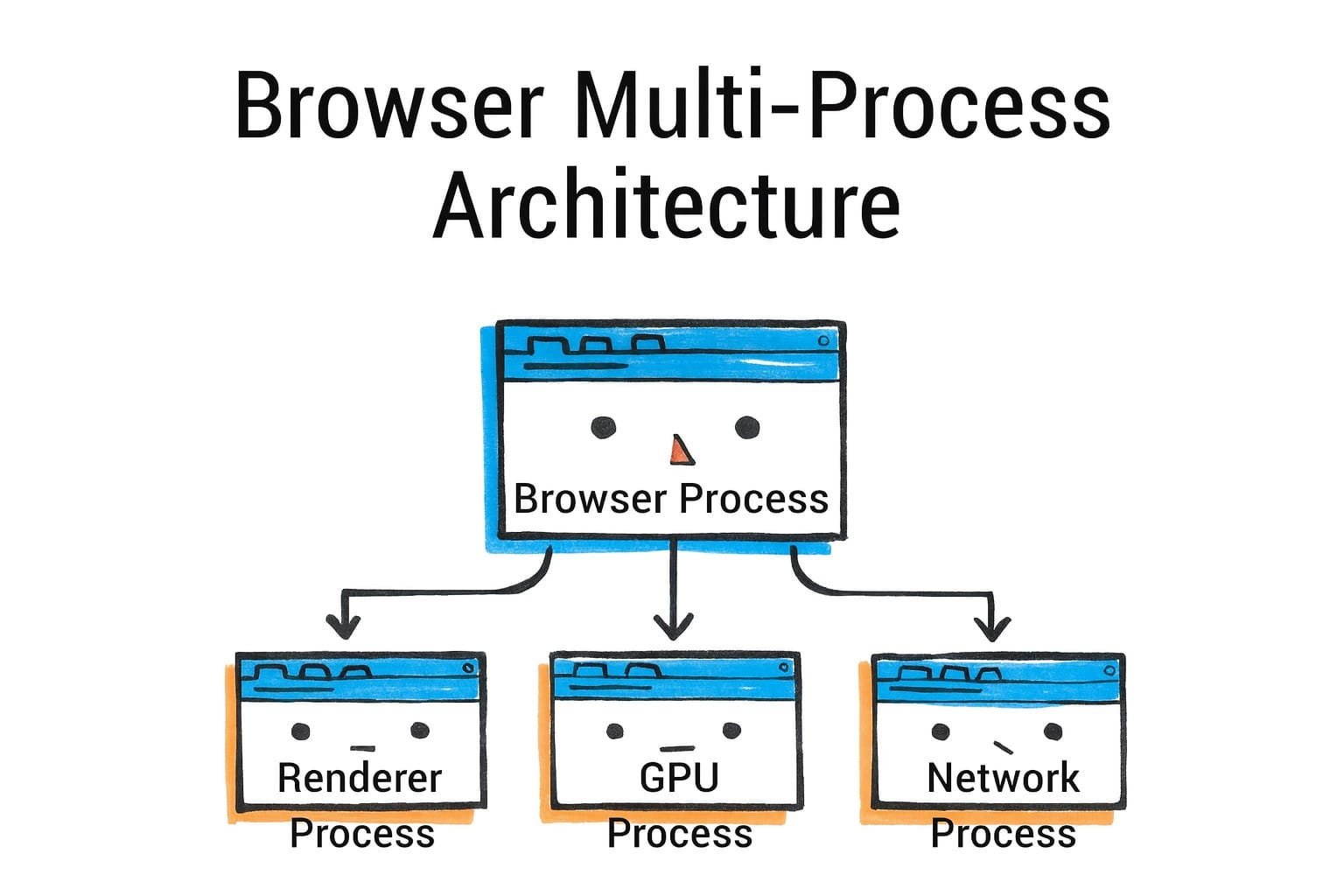
If you have multiple unrelated sites open, they’ll be in separate processes (Site A in one, Site B in another, etc.). Chrome even isolates cross-origin iframes into separate processes (more on that in site isolation). The renderer process is sandboxed and cannot directly access your file system or network arbitrarily - it has to go through the browser process for those privileged operations.
如果你打开了多个不相关的网站,它们将位于不同的进程中(网站 A 在一个进程中,网站 B 在另一个进程中,等等)。Chrome 甚至将跨源 iframe 隔离到单独的进程中(有关详细信息,请参阅站点隔离)。渲染进程是沙盒化的,不能直接访问你的文件系统或进行随意的网络操作——它必须通过浏览器进程来进行这些特权操作。
Other key processes in Chrome include:Chrome 中的其他关键进程包括:
-
GPU Process: a process dedicated to communicating with the GPU (as described earlier). All rendering and compositing requests from renderers go to the GPU process, which actually issues graphics API calls. This process is sandboxed and separate so that a GPU crash doesn’t take down renderers.
GPU 进程:这是一个专门用于与 GPU 通信的进程(如前所述)。所有来自渲染器的渲染和合成请求都会发送到 GPU 进程,该进程实际上会发出图形 API 调用。此进程是沙盒化的,并且是独立的,这样 GPU 崩溃就不会导致渲染器崩溃。
-
Network Process: (In older Chrome versions the network was a thread in browser process, but now it’s often a separate process through “servicification”). This process handles network requests, DNS, etc. and can be sandboxed separately.
网络进程:(在较旧的 Chrome 版本中,网络是一个浏览器进程中的线程,但现在通常通过“服务化”成为一个单独的进程)。此进程处理网络请求、DNS 等,并且可以单独沙盒化。
-
Utility Processes: these are for various services (like audio playback, image decoding, etc.) that Chrome may offload.
工具进程:这些是为各种服务(如音频播放、图像解码等)而设计的,Chrome 可能会将这些任务卸载到这些进程中。
-
Plugin Process: in the era of Flash and NPAPI plugins, plugins ran in their own process. Flash is deprecated now, so this is less relevant, but the architecture remains ready for plugins to not run in the main browser process.
插件进程:在 Flash 和 NPAPI 插件的年代,插件运行在自己的进程中。现在 Flash 已弃用,因此这一点不太相关,但架构仍然为插件不运行在主浏览器进程中做好了准备。
-
Extension Processes: Chrome extensions (which are essentially scripts that can act on web pages or the browser) run in separate processes as well, isolated from websites for security.
扩展进程:Chrome 扩展(本质上是可以在网页或浏览器上运行的脚本)也以单独的进程运行,并与网站隔离以确保安全。
A simplified view is: one Browser process coordinates multiple Renderer processes (one per tab or per site instance), plus one GPU process and a few others for services. Chrome’s task manager (Shift+Esc on Windows or via More Tools > Task Manager) will actually list each process type and its memory usage.
一种简化的视图是:一个浏览器进程协调多个渲染器进程(每个标签页或每个站点实例一个),再加上一个 GPU 进程以及其他一些服务进程。Chrome 的任务管理器(在 Windows 上按 Shift+Esc 或通过更多工具>任务管理器)实际上会列出每种进程类型及其内存使用情况。
Benefits of Multi-Process: The primary benefits are:
多进程的优势:主要优势包括:
-
Stability: If a web page (renderer process) crashes or leaks memory, it doesn’t crash the whole browser - you can close that tab and the rest stays alive. In one-process browsers, a single bad script could tear down everything. Chrome can show the “Aw, Snap” error for a single tab when its process dies, and you can reload it independently.
稳定性:如果一个网页(渲染进程)崩溃或内存泄漏,它不会导致整个浏览器崩溃——你可以关闭那个标签页,其他部分仍然正常运行。在一进程浏览器中,单个恶意脚本可能会摧毁一切。当 Chrome 的进程死亡时,它可以单独显示一个标签页的“Aw, Snap”错误,你可以独立地重新加载它。
-
Security (Sandboxing): By running web content in a restricted process, the browser can limit what that code can do on your system. Even if an attacker finds a vulnerability in the rendering engine, they are trapped in the sandbox - the renderer process typically cannot read your files or arbitrarily open network connections or launch programs. It must request the browser process for things like file access, which can be validated or denied. This sandbox is enforced at the OS level (using job objects, seccomp filters, etc. depending on platform).
安全(沙盒):通过在受限进程中运行网页内容,浏览器可以限制该代码在您的系统上能做什么。即使攻击者找到了渲染引擎的漏洞,他们也会被困在沙盒中——渲染进程通常无法读取您的文件或任意打开网络连接或启动程序。它必须请求浏览器进程进行文件访问等操作,这些请求可以被验证或拒绝。这个沙盒在操作系统级别强制执行(使用作业对象、seccomp 过滤器等,具体取决于平台)。
-
Performance Isolation: Intensive work in one tab (a heavy webapp or an infinite loop) is mostly confined to that tab’s renderer process. Other tabs (different process) can remain responsive because their processes aren’t blocked. Also, the OS can schedule processes on different CPU cores - so two heavy pages can run in parallel on a multi-core system better than if they were threads of one process.
性能隔离:在一个标签页中进行的密集工作(一个重量级 Web 应用或无限循环)主要局限于该标签页的渲染进程。其他标签页(不同的进程)可以保持响应,因为它们的进程没有被阻塞。此外,操作系统可以在不同的 CPU 核心上调度进程——因此,在多核系统上,两个重量级页面可以比作为同一个进程的线程更好地并行运行。
-
Memory segmentation: Each process has its own address space, so memory is not shared. This prevents one site from snooping on data of another and also means when a tab is closed, the OS can reclaim all memory from that process efficiently. The downside is some overhead due to duplicated resources and processes (each renderer loads its own copy of the JS engine, etc.).
内存分段:每个进程都有自己的地址空间,因此内存不会被共享。这可以防止一个站点窥探另一个站点的数据,也意味着当标签页关闭时,操作系统可以有效地从该进程回收所有内存。缺点是由于重复的资源和处理(每个渲染器加载 JS 引擎的副本等),存在一些开销。
Site Isolation: Initially, Chrome’s model was one process per tab. Over time they evolved it to one process per site (especially after Spectre - see next section on security). As of 2024, site isolation is enabled by default for 99% of Chrome users across desktop platforms, with Android support continuing to be refined. This means if you have two tabs both open to example.com, Chrome might decide to use one process for both (to save memory, because they’re the same site and thus less risky to put together). But a tab with example.com and an iframe of evil.com would by default put evil.com’s iframe in a separate process from the parent page (to protect the example.com data). This enforcement is what Chrome calls “Strict Site Isolation” (launched around Chrome 67 as a default). Site isolation causes Chrome to use 10-13% more system resources due to increased process creation, but provides crucial security benefits.
站点隔离:最初,Chrome 的模型是每个标签页一个进程。随着时间的推移,他们将其演变为每个网站一个进程(特别是在 Spectre 之后 - 见下一节关于安全性)。截至 2024 年,站点隔离在桌面平台上的 99% 的 Chrome 用户中默认启用,而 Android 的支持仍在不断完善中。这意味着如果你有两个标签页都打开到 example.com,Chrome 可能会决定为这两个标签页使用同一个进程(以节省内存,因为它们是同一个网站,因此将它们放在一起的风险较低)。但一个打开 example.com 和一个 evil.com 的 iframe 的标签页,默认情况下会将 evil.com 的 iframe 放在与父页面不同的进程中(以保护 example.com 的数据)。Chrome 将这种强制执行称为“严格站点隔离”(大约在 Chrome 67 时作为默认选项推出)。站点隔离导致 Chrome 使用 10-13% 更多的系统资源,因为进程创建增加了,但它提供了至关重要的安全优势。
Firefox’s architecture, called Electrolysis (e10s), was historically one content process for all tabs (for many years Firefox was single-process and only enabled a few content processes around 2017). As of 2021, Firefox uses multiple content processes (by default 8 for web content). With Project Fission (site isolation), Firefox is moving toward isolating sites similarly - it can spin up new processes for cross-site iframes, and in Firefox 108+ they enabled site isolation by default, increasing the number of processes to potentially one per site like Chrome. Firefox also has a GPU process (for WebRender and compositing) and a separate networking process, similar to Chrome’s split. So in practice, Firefox now has a very Chrome-like model: a parent process, a GPU process, a network process, a few content (renderer) processes, and some utility processes (for extensions, media decoding, etc. - e.g. a media plugin can run isolated).
Firefox 的架构,称为 Electrolysis(e10s),历史上曾为所有标签使用单个内容进程(多年来 Firefox 是单进程的,直到 2017 年才启用少数几个内容进程)。截至 2021 年,Firefox 使用多个内容进程(默认为 8 个用于网页内容)。随着 Project Fission(站点隔离)的推出,Firefox 正朝着类似 Chrome 的方向发展,它会为跨站 iframe 启动新的进程,并且在 Firefox 108 及以上版本中默认启用了站点隔离,将进程数量增加到每个站点可能一个,类似于 Chrome。Firefox 还有一个 GPU 进程(用于 WebRender 和合成)以及一个单独的网络进程,类似于 Chrome 的分离。因此,实际上 Firefox 现在具有非常类似 Chrome 的模型:一个父进程、一个 GPU 进程、一个网络进程、几个内容(渲染器)进程和一些实用进程(用于扩展、媒体解码等——例如,一个媒体插件可以独立运行)。
Safari (WebKit) likewise moved to a multi-process model (WebKit2) where each tab’s content is in a separate WebContent process and a central UI process controls them. Safari’s WebContent processes are also sandboxed and cannot directly access devices or files without going through the UI process. Safari also has a networking process that is shared (and possibly other helpers). So while implementations differ, the concept is consistent: isolate each webpage’s code in its own sandboxed environment.
Safari (WebKit) 同样转向了多进程模型(WebKit2),其中每个标签页的内容都在一个单独的 WebContent 进程中,而一个中央 UI 进程控制它们。Safari 的 WebContent 进程也是沙盒化的,并且不能直接访问设备或文件,除非通过 UI 进程。Safari 还有一个网络进程,它是共享的(并且可能还有其他辅助进程)。因此,尽管实现方式不同,但概念是一致的:将每个网页的代码隔离在其自己的沙盒化环境中。
One important point is inter-process communication (IPC): How do these processes talk to each other? Browsers use IPC mechanisms (on Windows, often named pipes or other OS IPC; on Linux, maybe Unix domain sockets or shared memory; Chrome has its own IPC library Mojo). For example, when a network response arrives in the Network process, it needs to be delivered to the correct Renderer process (via the Browser process coordinating). Similarly, when you do a DOM fetch(), the JS engine will call into a network API which sends a request to the Network process and so on. IPC adds complexity, but browsers optimize heavily (e.g. using shared memory for transferring large data like images efficiently, and posting asynchronous messages to avoid blocking).
一个重要的点是进程间通信(IPC):这些进程如何相互通信?浏览器使用 IPC 机制(在 Windows 上,通常是命名管道或其他操作系统 IPC;在 Linux 上,可能是 Unix 域套接字或共享内存;Chrome 有自己的 IPC 库 Mojo)。例如,当网络响应到达 Network 进程时,它需要被传递到正确的 Renderer 进程(通过协调的 Browser 进程)。类似地,当你执行 DOM fetch()时,JS 引擎会调用一个网络 API,该 API 向 Network 进程发送请求等等。IPC 增加了复杂性,但浏览器进行了大量优化(例如,使用共享内存高效地传输大型数据,如图像,并发布异步消息以避免阻塞)。
Process Allocation Strategies: Chrome doesn’t always create a brand new process for every single tab - there are limits (particularly on devices with low memory, it may reuse processes for same-site tabs). Chrome will reuse an existing renderer if you open another tab to the same site, to conserve memory (this is why sometimes two tabs of the same site share process). It also has a limit on total processes (which can scale based on RAM). When the limit is hit, it might start putting multiple unrelated sites in one process, though it tries hard to avoid mixing sites if site isolation is enabled. On Android, Chrome uses fewer processes because of the memory constraints (often a max of 5-6 processes for content).
进程分配策略:Chrome 并非为每个标签页都创建一个全新的进程——存在限制(尤其是在内存较低的设备上,它可能会为同站标签页复用进程)。如果你打开另一个同站标签页,Chrome 会复用现有的渲染器以节省内存(这就是为什么有时两个同站标签页会共享进程的原因)。它对总进程数也有限制(该限制可以根据 RAM 进行扩展)。当达到限制时,它可能会将多个无关的站点放入一个进程中,尽管如果启用了站点隔离,它会尽力避免混合站点。在 Android 上,由于内存限制,Chrome 使用更少的进程(内容进程通常最多 5-6 个)。
One more concept in Chromium is servicification: splitting browser components into services that could run in separate processes. For example, the Network Service was made a separate module that can run out-of-process. The idea is modularity - powerful systems can run each service in its own process, whereas constrained devices might consolidate some services back into one process to save overhead. Chrome can decide at runtime or build time how to deploy these services. As noted in the snippet, on high-end it might split everything (UI, net, GPU, etc. all separate), and on low-end (Android) it might combine browser & network in one process to cut down overhead.
Chromium 中还有一个概念是服务化:将浏览器组件拆分成可以在单独进程中运行的服务。例如,网络服务被做成一个可以脱离进程运行的独立模块。其核心思想是模块化——强大的系统可以让每个服务在各自的进程中运行,而受限设备可能会将一些服务合并回一个进程中以节省开销。Chrome 可以在运行时或构建时决定如何部署这些服务。正如代码片段中提到的,在高性能设备上可能会将所有内容拆分(UI、网络、GPU 等全部独立),而在低端设备(如 Android)上可能会将浏览器和网络合并到一个进程中以降低开销。
The takeaway: Chromium’s architecture is designed to run the browser UI and each site in different sandboxes, using processes as the isolation boundary. Firefox and Safari have converged on similar designs. This architecture greatly improves security and reliability at the cost of more memory usage. The web content processes are treated as untrusted, and that’s where site isolation (next section) comes into play to even isolate different origins from each other within separate processes.
要点:Chromium 的架构设计为在隔离沙盒中运行浏览器 UI 和每个站点,使用进程作为隔离边界。Firefox 和 Safari 已经趋同于类似的设计。这种架构以增加内存使用为代价,极大地提高了安全性和可靠性。网页内容进程被视为不受信任的,这就是站点隔离(下一节)发挥作用的地方,它甚至在单独的进程中隔离不同的源彼此之间。
Site Isolation and Sandboxing
站点隔离和沙盒
Site isolation and sandboxing are security features that build on the multi-process foundation. They aim to ensure that even if malicious code runs in the browser, it cannot easily steal data from other sites or access your system.
站点隔离和沙箱化是构建在多进程基础上的安全功能。它们旨在确保即使恶意代码在浏览器中运行,也无法轻易地从其他站点窃取数据或访问您的系统。
Site Isolation: We’ve touched on this - it means that different websites (different sites, more strictly) run in different renderer processes. Chrome’s site isolation was boosted after the Spectre vulnerability came to light in 2018. Spectre showed that malicious JavaScript could potentially read memory it shouldn’t (by exploiting CPU speculative execution). If two sites were in the same process, a malicious site could use Spectre to snoop on memory of the sensitive site (like your banking site). The only robust solution is to not let them share a process at all. So Chrome made site isolation a default: every site gets its own process, including cross-origin iframes. Firefox has followed with Project Fission (enabled by default in recent versions), which aims for the same - they cite isolating every site in its own process for security. This is a significant change from the past where if you had a parent page and multiple iframes from various domains, they might all live in one process (especially if they were in one tab). Now, those iframes would be split so that e.g. an <iframe src=“https://evil.com”> on a good site page is forced into a different process, preventing even low-level attacks from leaking info between them.
站点隔离:我们之前提到过这个概念——这意味着不同的网站(更严格地说,是不同的站点)在不同的渲染进程中运行。Chrome 的站点隔离在 2018 年 Spectre 漏洞曝光后得到了加强。Spectre 表明,恶意的 JavaScript 可以通过利用 CPU 的推测执行来读取它不应该访问的内存。如果两个站点在同一个进程中,恶意站点可以使用 Spectre 来窥探敏感站点的内存(比如你的银行网站)。唯一稳固的解决方案是根本不让它们共享同一个进程。因此,Chrome 将站点隔离设为默认选项:每个站点都有自己的进程,包括跨源 iframe。Firefox 也推出了 Project Fission(在最新版本中默认启用),目标也是实现同样的效果——他们引用了将每个站点隔离在自己的进程中以提高安全性。这与过去的情况形成了显著对比,过去如果你有一个父页面和多个 iframe,不同的域可能都存在于一个进程中(特别是如果它们在同一个标签页中)。现在,这些 iframe 会被分割,例如,在一个好的网站页面上,一个 <iframe src=“https://evil.com”>会被强制放入不同的进程,防止低级别的攻击在它们之间泄露信息。
From a developer point of view, site isolation is mostly transparent. One implication is that communications between an embedded iframe and its parent might cross process boundaries now, so things like postMessage between them are implemented via IPC under the hood. But the browser makes this seamless; you as a dev just use the APIs as normal.
从开发者的角度来看,站点隔离基本上是透明的。一个影响是,嵌入的 iframe 与其父级之间的通信现在可能会跨越进程边界,因此它们之间的 postMessage 等功能在底层通过 IPC 实现。但浏览器使这一切变得无缝;作为开发者,你只需像平常一样使用 API 即可。
Sandboxing: Each renderer process (and other auxiliary processes) run in a sandbox with restricted privileges. For example, on Windows, Chrome uses a job object and drops privileges so the renderer can’t call most Win32 APIs that access the system. On Linux, it uses namespaces and seccomp filters to limit syscalls. The renderer basically can compute and render content but if it tries to open a file or camera or microphone, it will be blocked (unless going through proper channels that ask user permission via the browser process). WebKit’s documentation explicitly notes that WebContent processes have no direct access to filesystem, clipboard, devices, etc. - they must request via the UI process which mediates. This is why, for example, when a site tries to use your microphone, the permission prompt is shown by the browser UI (browser process) and if allowed, the actual recording is done in a controlled process. The sandbox is a crucial line of defense. Even if an attacker finds a bug to run native code in the renderer, they then face the sandbox barrier - they’d need a separate exploit (an “escape”) to break out to the system. This layered approach (called site isolation + sandbox) is state-of-the-art for browser security.
沙盒化:每个渲染进程(以及其他辅助进程)都在一个具有受限权限的沙盒中运行。例如,在 Windows 上,Chrome 使用作业对象并降低权限,这样渲染进程就不能调用大多数访问系统的 Win32 API。在 Linux 上,它使用命名空间和 seccomp 过滤器来限制系统调用。渲染进程基本上可以计算和渲染内容,但如果它尝试打开文件或相机或麦克风,它将被阻止(除非通过正确的渠道请求用户权限,通过浏览器进程)。WebKit 的文档明确指出,WebContent 进程没有直接访问文件系统、剪贴板、设备等的权限——它们必须通过 UI 进程请求,UI 进程进行中介。这就是为什么,例如,当网站尝试使用您的麦克风时,权限提示由浏览器 UI(浏览器进程)显示,如果允许,实际录音是在受控进程中完成的。沙盒是一个至关重要的利防御之一。即使攻击者找到一个在渲染器中运行原生代码的漏洞,他们随后会面临沙盒障碍——他们需要另一个利用(一个“逃逸”)才能突破到系统。这种分层方法(称为站点隔离+沙盒)是浏览器安全领域的最先进技术。
Firefox’s sandboxing is also quite strict now (it was weaker in early e10s days but they ramped it up). Firefox content processes can’t directly access much either; and Firefox also sandboxes the GPU process to handle graphics driver issues.
现在 Firefox 的沙盒也非常严格(在早期 e10s 时代较弱,但后来加强了)。Firefox 的内容进程也不能直接访问太多内容;而且 Firefox 还将 GPU 进程沙盒化以处理图形驱动程序问题。
Out-of-Process iframes (OOPIF): In Chrome’s implementation of site isolation, they invented the term OOPIF for out-of-process iframe. From a user’s perspective, nothing changes, but in Chrome’s internal architecture, each frame of a page can potentially be backed by a different renderer process. The top-level frame and same-site frames share one process; cross-site frames use different processes. All those processes “cooperate” to render a single tab’s content, coordinated by the browser process. This is pretty complex, but Chrome has a frame tree that can span processes. It means your one tab might be running N processes (one for the main document, others for each cross-site subdocument). They communicate via IPC for things like DOM events crossing the boundary or certain JavaScript calls that involve cross-context. The web platform (through specs like COOP/COEP, SharedArrayBuffer, etc.) is evolving with these constraints in mind after Spectre.
进程外 iframe(OOPIF):在 Chrome 的站点隔离实现中,他们为进程外 iframe 发明了 OOPIF 这个术语。从用户的角度来看,没有任何变化,但在 Chrome 的内部架构中,每个页面的每个帧都可能由不同的渲染进程支持。顶层帧和同站帧共享一个进程;跨站帧使用不同的进程。所有这些进程“协同”渲染单个标签页的内容,由浏览器进程协调。这相当复杂,但 Chrome 有一个可以跨进程的帧树。这意味着你的一个标签页可能正在运行 N 个进程(一个用于主文档,其他用于每个跨站子文档)。它们通过 IPC 进行通信,用于 DOM 事件跨越边界或涉及跨上下文的某些 JavaScript 调用。Web 平台(通过 COOP/COEP、SharedArrayBuffer 等规范)) 在 Spectre 之后,正在考虑到这些限制而发展。
Memory and Performance Costs: Site isolation does increase memory usage because more processes are used. Chrome devs noted it could be a 10-20% memory overhead in some cases. They mitigated some by something called “best-effort process consolidation” for same-site, and by limiting how many processes can be spawned (we mentioned earlier). Firefox initially didn’t isolate every site due to memory concerns but after Spectre they found ways to do it more efficiently with 8-privileged-process limit and on-demand process creation. Safari historically has a strong process model but I’m not sure if it isolates cross-site iframes; WebKit2 certainly isolates top-level pages. Apple’s focus is often also on privacy (Intelligent Tracking Prevention will partition cookies, etc.), but that’s a different layer.
内存和性能成本:站点隔离确实会增加内存使用,因为会使用更多的进程。Chrome 开发者指出在某些情况下,这可能是 10-20% 的内存开销。他们通过“最佳努力进程合并”技术来缓解部分问题(针对同站点的进程),并通过限制可以启动的进程数量(我们之前提到过)。Firefox 最初由于内存问题并未隔离每个站点,但在 Spectre 漏洞出现后,他们找到了更高效的方法,通过限制特权进程数量(8 个)和按需创建进程来实现。Safari 历史上拥有强大的进程模型,但我不确定它是否隔离跨站点的 iframe;WebKit2 确实隔离了顶级页面。苹果公司的关注点也经常在于隐私(智能跟踪防护将分区 Cookie 等),但这属于不同的层次。
Cross-site prefetches are limited for privacy reasons and will currently only work if the user has no cookies set for the destination site, preventing sites from tracking user activity via prefetched pages that may never be visited.
出于隐私原因,跨站预取受到限制,目前只有在用户没有为目标站点设置 cookie 时才会生效,这可以防止站点通过预取的、可能永远不会被访问的页面来跟踪用户活动。
All in all, site isolation ensures that the principle of least privilege is applied: code from origin A cannot access data from origin B unless via web APIs with explicit consent (like postMessage or storage that’s partitioned). And the sandbox ensures that even if code is rogue, it can’t touch your system directly. These measures make browser exploits much harder - an attacker typically needs multiple chain exploits now (one to break renderer, one to escape sandbox) to do serious damage, which raises the bar significantly.
总而言之,站点隔离确保了最小权限原则的执行:来自源 A 的代码不能访问来自源 B 的数据,除非通过具有明确同意的 Web API(如 postMessage 或分区存储)。而沙盒确保即使代码是恶意的,也无法直接触及您的系统。这些措施使浏览器漏洞利用变得更加困难——攻击者现在通常需要多个链式漏洞利用(一个用于破坏渲染器,一个用于逃逸沙盒)才能造成严重损害,这显著提高了门槛。
As a web developer, you might not directly feel site isolation, but you benefit from it through a safer web. One thing to be aware of is that cross-origin interactions might have slightly more overhead (because of IPC) and that some optimizations like in-process script sharing aren’t possible across origins. But browsers are continuously optimizing the messaging between processes to minimize any performance hit.
作为一名网页开发者,你可能不会直接感受到站点隔离,但你能从更安全的网络中受益。需要注意的是,跨域交互可能会有轻微的性能开销(因为 IPC 的原因),并且一些优化(如进程内脚本共享)无法跨域实现。但浏览器正在持续优化进程间消息传递,以最大程度地减少任何性能影响。
Now, after covering security, let’s turn to tools and performance instrumentation - essentially, how we developers can peek into this pipeline and measure or debug it.
现在,在讨论了安全性之后,让我们转向工具和性能监控——本质上,我们开发者如何能够窥探这个流程并对其进行测量或调试。
Comparing Chromium, Gecko, and WebKit
Chromium、Gecko 与 WebKit 对比
We’ve mainly described Chrome/Chromium’s behavior (Blink engine for HTML/CSS, V8 for JS, multi-process via Aura/Chromium infrastructure). Other major engines - Mozilla’s Gecko (used in Firefox) and Apple’s WebKit (used in Safari) - share the same fundamental goals and a broadly similar pipeline, but there are noteworthy differences and historical divergences.
我们主要描述了 Chrome/Chromium 的行为(使用 Blink 引擎处理 HTML/CSS,使用 V8 引擎处理 JS,通过 Aura/Chromium 基础设施实现多进程)。其他主要引擎——Mozilla 的 Gecko(用于 Firefox)和 Apple 的 WebKit(用于 Safari)——有着相同的基本目标和大致相似的流程,但存在显著的差异和历史分歧。
Shared Concepts: All engines parse HTML into a DOM, parse CSS into style data, compute layout, and paint/composite. All have JS engines with JITs and garbage collection. And all modern ones are multi-process (or at least multi-threaded) for parallelism and security.
共享概念:所有引擎都将 HTML 解析为 DOM,将 CSS 解析为样式数据,计算布局,并进行绘制/合成。所有引擎都配备 JS 引擎,支持 JIT 和垃圾回收。而且所有现代引擎都是多进程(或至少是多线程)的,以实现并行处理和增强安全性。
Differences in CSS/Style System
CSS 与样式系统差异
One interesting difference is how CSS style computation is implemented by rendering engine:
一个有趣的不同点在于渲染引擎如何实现 CSS 样式计算:
-
Blink (Chromium): Uses a single-threaded style engine in C++ (historically based on WebKit’s). It computes style sequentially for the DOM tree. It has had incremental style invalidation optimizations, but by and large it’s one thread doing the work (apart from some minor parallelization in animation).
Blink(Chromium):使用 C++中的单线程样式引擎(历史上基于 Webkit)。它按顺序计算 DOM 树的样式。它已经有过增量样式失效的优化,但大体上是一个线程在做工作(除了动画中的一些轻微并行化)。
-
Gecko (Firefox): In the Quantum project (2017), Firefox integrated Stylo, a new CSS engine written in Rust, which is multi-threaded. Firefox can calculate style for different DOM subtrees in parallel using all CPU cores. This was a major performance improvement for CSS in Gecko. So, style recalculation in Firefox might use 4 cores to do what Blink does on 1. This is one advantage of Gecko’s approach (at the cost of complexity).
Gecko (Firefox): 在 Quantum 项目(2017 年)中,Firefox 集成了 Stylo,这是一个用 Rust 编写的新 CSS 引擎,它是多线程的。Firefox 可以使用所有 CPU 核心,并行计算不同 DOM 子树的风格。这对 Gecko 中的 CSS 性能是一个重大的改进。因此,Firefox 中的风格重新计算可能使用 4 个核心来完成 Blink 在 1 个核心上所做的事情。这是 Gecko 方法的一个优势(以复杂性为代价)。
-
WebKit (Safari): WebKit’s style engine is single-threaded like Blink (since Blink forked from WebKit in 2013, they shared architecture up to that point). WebKit has done interesting things like a bytecode JIT for CSS selectors matching. It may transform CSS selectors into bytecode and JIT compile a matcher for speed. Blink did not adopt that (it uses iterative matching).
WebKit (Safari): WebKit 的样式引擎是单线程的,类似于 Blink(由于 Blink 在 2013 年从 WebKit 分叉出来,在此之前它们共享架构)。WebKit 做了一些有趣的事情,比如为 CSS 选择器匹配使用字节码 JIT。它可以将 CSS 选择器转换为字节码,并 JIT 编译一个匹配器以提高速度。Blink 没有采用这种方法(它使用迭代匹配)。
So, in CSS, Gecko stands out with parallel style computation via Rust. Blink and WebKit rely on optimized C++ and maybe some JIT tricks (in WebKit’s case).
因此,在 CSS 方面,Gecko 通过 Rust 实现了并行样式计算,脱颖而出。Blink 和 WebKit 依赖于优化的 C++,也许还有一些 JIT 技巧(在 WebKit 的情况下)。
Layout and Graphics
布局和图形
All three engines implement the CSS box model and layout algorithms. Specific features might land in one before others (e.g. at one time WebKit was ahead in CSS Grid support, then Blink caught up - often they share code through standards bodies).
所有三个引擎都实现了 CSS 盒子模型和布局算法。特定功能可能会先出现在其中一个引擎中(例如,曾经 Webkit 在 CSS Grid 支持方面领先,然后 Blink 赶了上来——他们通常通过标准组织共享代码)。
Firefox (Gecko) made a huge change by introducing WebRender as its compositor/rasterizer. WebRender is now the default rendering engine in Firefox and has contributed to significant performance improvements, particularly for graphics-intensive web content. WebRender (also Rust) basically takes the display list and renders it on the GPU directly, handling things like tessellating shapes, text, etc. with the GPU. It’s like moving more painting work to the GPU. In Chrome’s pipeline, rasterization is still done on CPU (for most content) then sent to GPU as bitmaps. WebRender tries to avoid making bitmaps for whole layers and instead draw vectors on GPU (except for text glyphs which it caches as atlas textures). This means Firefox can potentially animate more content at high performance because it doesn’t need to re-rasterize everything if only small portions change - it can redraw via GPU very quickly. It’s akin to how a game engine redraws a scene every frame using GPU calls. The downside is it’s complex to implement and tune, and can stress the GPU more. But as GPU power grows, this approach is forward-looking. Chrome’s team considered a similar approach (“SKIA GPU” path) but has not done a full WebRender style overhaul.
Firefox (Gecko) 通过引入 WebRender 作为其合成器/光栅化器进行了巨大变革。WebRender 现在是 Firefox 中的默认渲染引擎,并显著提升了性能,特别是在图形密集型网页内容方面。WebRender(也使用 Rust)基本上直接在 GPU 上渲染显示列表,使用 GPU 处理形状、文本等事务。这就像是将更多的绘制工作移至 GPU。在 Chrome 的管线中,光栅化仍然在 CPU 上完成(针对大多数内容),然后作为位图发送到 GPU。WebRender 尝试避免为整个图层创建位图,而是在 GPU 上绘制矢量(文本字形除外,它会将其缓存为纹理图集)。这意味着 Firefox 可以在高性能下动画化更多内容,因为它不需要重新光栅化所有内容,即使只有小部分发生变化,也可以通过 GPU 非常快速地重绘。这类似于游戏引擎重绘的方式。使用 GPU 调用在每一帧渲染一个场景。缺点是它实现和调优复杂,并且会给 GPU 带来更大压力。但随着 GPU 性能的增长,这种方法是面向未来的。Chrome 的团队考虑了类似的方法(“SKIA GPU” 路径),但没有进行完整的 WebRender 风格的改版。
Safari (WebKit) uses an approach more similar to older Chrome: it has a converts the compositor with layers (called CALayer, since on Mac and iOS it uses Core Animation layers). Safari was early to move to GPU compositing (iPhone OS and Safari 4 in 2009 had hardware-accelerated compositing for certain CSS like transforms). Safari and Chrome diverged but conceptually both do tiling and compositing. Safari also offloads a lot to the GPU (and uses tiling, especially on iOS where tile drawing was fundamental for smooth scrolling).
Safari(WebKit)使用的方法与旧版 Chrome 更相似:它将合成器与层(在 Mac 和 iOS 上称为 CALayer,因为它们使用 Core Animation 层)进行转换。Safari 很早就转向了 GPU 合成(iPhone OS 和 2009 年的 Safari 4 在某些 CSS 如变换方面具有硬件加速的合成)。Safari 和 Chrome 分道扬镳,但概念上两者都进行瓦片化和合成。Safari 也大量将任务卸载到 GPU(并且使用瓦片化,特别是在 iOS 上,瓦片绘制对于平滑滚动至关重要)。
Mobile optimizations: Each engine has special cases for mobile. For example, WebKit has the concept of tile coverage for scrolling (used in iOS’s UIWebView historically). Chrome on Android uses “tiling” and tries to keep raster tasks minimal to hit frame rates. Firefox’s WebRender came from the mobile-first Servo project.
移动端优化:每个引擎都有针对移动端的特殊情况。例如,WebKit 有滚动时的瓦片覆盖概念(iOS 的 UIWebView 历史上使用过)。Android 上的 Chrome 使用“瓦片”技术,并尽量减少光栅任务以保持帧率。Firefox 的 WebRender 源自移动优先的 Servo 项目。
JavaScript Engines
JavaScript 引擎
-
V8 (Chromium) we described: Ignition, Sparkplug, TurboFan, Maglev as of 2023.
V8(Chromium)我们描述过:截至 2023 年的 Ignition、Sparkplug、TurboFan、Maglev。
-
SpiderMonkey (Firefox): It historically had an interpreter, then a Baseline JIT and an optimizing JIT (IonMonkey). Since Firefox 83 (2021), IonMonkey has been fully replaced by WarpMonkey, which builds on CacheIR data rather than a separate type inference system. Current tiers are: Baseline Interpreter, Baseline JIT, and WarpMonkey as the top-tier optimizing compiler. SpiderMonkey also has a different GC (also generational, called Incremental GC since 2012, and now mostly incremental/concurrent).
SpiderMonkey (Firefox):它历史上曾有一个解释器,然后是一个 Baseline JIT 和一个优化 JIT(IonMonkey)。自 Firefox 83(2021 年)以来,IonMonkey 已被 WarpMonkey 完全取代,WarpMonkey 基于 CacheIR 数据而不是一个独立的类型推断系统。当前的层级是:Baseline 解释器、Baseline JIT,以及 WarpMonkey 作为顶级的优化编译器。SpiderMonkey 还有一个不同的 GC(也是代际的,自 2012 年起称为 Incremental GC,现在主要是增量/并发)。
-
JavaScriptCore (Safari): As noted, it has 4 tiers (LLInt, Baseline, DFG, FTL). It uses a different GC (WebKit’s GC is a generational mark-sweep called Butterfly or Boehm variations historically, now bmalloc etc.). JSC’s FTL uses LLVM to optimize, which is unique (V8 and SM have their own compilers, JSC leverages LLVM for one tier). This can yield very fast code, but the compilation is heavy. JSC tends to prioritize peak performance on certain benchmarks (it often shines on some, but V8 tends to catch up; they leapfrog).
JavaScriptCore (Safari):如前所述,它有 4 个层级(LLInt、Baseline、DFG、FTL)。它使用不同的垃圾回收器(WebKit 的垃圾回收器是一个代际标记清除器,历史上称为 Butterfly 或 Boehm 变种,现在使用 bmalloc 等)。JSC 的 FTL 使用 LLVM 进行优化,这是独特的(V8 和 SM 有自己的编译器,JSC 利用 LLVM 为其中一个层级)。这可以生成非常快的代码,但编译过程很重。JSC 倾向于在某些基准测试中优先考虑峰值性能(它在某些测试中表现优异,但 V8 往往能迎头赶上;它们互相超越)。
In terms of ES features, all three engines are pretty much up-to-date with the latest standards, thanks to test262 and each other’s competition.
在 ES 功能方面,这三个引擎基本上都符合最新标准,这得益于 test262 以及彼此间的竞争。
Multi-Process Model Differences
多进程模型差异
-
Chrome: each tab typically separate, site isolation at origin level, lots of processes (can be dozens).
Chrome:每个标签页通常独立,网站隔离在源级别,进程数量较多(可达几十个)。
-
Firefox: fewer processes by default (8 content processes handling all tabs, plus more if needed for cross-site iframes with Fission). So, it’s not necessarily one process per tab; tabs share content processes in a pool. This means Firefox might have lower memory usage under many-tab scenarios, but it also means one content process crash can take out multiple tabs (though it tries to group by site, so maybe all Facebook tabs in one process, etc.).
Firefox:默认情况下进程更少(8 个内容进程处理所有标签页,如果需要处理跨站 iframe,则使用 Fission 会创建更多进程)。因此,并非每个标签页都对应一个进程;标签页共享内容进程池。这意味着在多标签页场景下,Firefox 的内存使用可能更低,但也意味着一个内容进程崩溃可能会影响多个标签页(尽管它会尝试按站点分组,所以可能所有 Facebook 标签页都在一个进程中等)。
-
Safari: likely one process per tab (or per a few tabs) - on iOS, WKWebView definitely isolates each webview. Safari desktop historically did each tab separate as well. Not sure if they isolate cross-origin iframes yet - Apple hasn’t talked about Spectre mitigations much, but Safari does have process per domain for top-level at least.
Safari:每个标签页(或几个标签页)可能对应一个进程——在 iOS 上,WKWebView 确实为每个 webview 进行隔离。Safari 桌面版历史上也是每个标签页分离的。不确定他们是否已经隔离跨源 iframe——苹果很少谈论 Spectre 缓解措施,但至少 Safari 对顶级域有每个域一个进程的设置。
Interprocess Coordination: All engines have to solve similar problems like how to implement alert() (which blocks JS) in a multi-process environment - typically the browser process shows the alert UI and pauses that script context. Or how to handle prompt/confirm, how to do Modal dialogs, etc. There are subtle differences (e.g. Chrome doesn’t truly block the thread for alert - it spins a nested runloop in the renderer, etc. whereas Firefox might still freeze that tab’s process).
进程间协调:所有引擎都必须解决类似的问题,比如如何在多进程环境中实现 alert()(它会阻塞 JS)——通常浏览器进程会显示 alert UI 并暂停该脚本上下文。或者如何处理 prompt/confirm,如何实现模态对话框等。存在一些细微差异(例如 Chrome 不会真正阻塞线程以显示 alert——它在渲染器中旋转一个嵌套的 runloop,而 Firefox 可能会冻结该标签页的进程)。
Crash handling: Chrome and Firefox both have crash reporters that can restart a crashed content process and show an error in the tab. Safari’s Web Content process crash typically will display a simpler error message in the content area.
崩溃处理:Chrome 和 Firefox 都有崩溃报告器,可以重启崩溃的内容进程并在标签页中显示错误。Safari 的 Web 内容进程崩溃通常会显示一个更简单的错误消息在内容区域。
Feature Implementation Divergence
功能实现差异
Some web platform features are engine-specific: e.g. The View Transitions API (formerly experimental in Chrome) reached Baseline Newly Available status in October 2025, with same-document transitions now supported across Chrome 111+, Edge 111+, Firefox 133+, and Safari 18+. Cross-document transitions (for multi-page apps) are supported in Chrome 126+, Edge 126+, and Safari 18.2+, with Firefox support still pending.
一些网络平台功能是引擎特定的:例如,视图过渡 API(以前在 Chrome 中是实验性的)已于 2025 年 10 月达到基础新可用状态,现在跨 Chrome 111+、Edge 111+、Firefox 133+和 Safari 18+支持同文档过渡。跨文档过渡(用于多页应用程序)在 Chrome 126+、Edge 126+和 Safari 18.2+中得到支持,而 Firefox 的支持仍在等待中。
Developer tools: Chrome’s DevTools is very advanced. Firefox’s DevTools also very good (with some unique features like CSS Grid highlighters early on, shape editor). Safari’s Web Inspector is fine but not as full-featured in some areas. These differences can matter to devs debugging in each browser.
开发者工具:Chrome 的 DevTools 非常先进。Firefox 的 DevTools 也非常好(有一些独特的功能,如早期的 CSS Grid 高亮器和形状编辑器)。Safari 的 Web Inspector 还可以,但在某些方面功能不够全面。这些差异对在各个浏览器中调试的开发者可能很重要。
Performance Trade-offs
性能权衡
Historically, Chrome was lauded for faster JS and overall performance due to multi-process and V8. Firefox with Quantum closed a lot of gaps, sometimes surpassing Chrome in graphics (WebRender can be very fast for complex pages). Safari often excels in graphics and low power usage on Apple hardware (they optimize for power a lot).
历史上,Chrome 因多进程和 V8 而备受赞誉,其 JS 速度和整体性能都很快。Firefox 的 Quantum 更新缩小了与 Chrome 的差距,有时在图形方面甚至超越 Chrome(WebRender 在复杂页面上可以非常快)。Safari 在 Apple 硬件上的图形和低功耗表现通常非常出色(他们非常注重优化功耗)。
Memory: Chrome has a reputation for high memory usage (all those processes). Firefox tries to be a bit more conservative. Safari is very memory efficient on iOS out of necessity (limited RAM), and they do a lot of memory optimization in WebKit.
内存:Chrome 以高内存使用率而闻名(所有那些进程)。Firefox 试图更加保守。Safari 在 iOS 上非常内存高效,这是出于必要(RAM 有限),他们在 WebKit 中进行了很多内存优化。
External Contributors: Interesting note - a lot of improvements in these engines come from external teams like Igalia (e.g. implementing CSS Grid in both WebKit and Blink). So sometimes features land roughly simultaneously.
外部贡献者:一个有趣的注意点 - 这些引擎中的许多改进都来自像 Igalia 这样的外部团队(例如,在 WebKit 和 Blink 中实现 CSS Grid)。所以有时功能会大致同时发布。
From a web developer’s perspective, the differences often manifest as:
从一个网页开发者的角度来看,这些差异通常表现为:
-
Needing to test on all engines because there might be slight differences or bugs in one’s implementation of a CSS feature or an API.
需要测试所有引擎,因为一个 CSS 功能或 API 的实现中可能会有细微的差异或错误。
-
Performance might differ (for example, a particular JS workload might be faster in one engine than another due to JIT heuristics).
性能可能会有所不同(例如,由于 JIT 启发式算法,特定的 JS 工作负载在一个引擎上可能比另一个引擎更快)。
-
Some APIs might not be available in one (Safari is often last to implement some new APIs like WebRTC or IndexedDB versions, etc. though they eventually do).
有些 API 可能在一个(Safari 通常是最晚实现一些新 API,如 WebRTC 或 IndexedDB 版本等,尽管他们最终会实现)不可用。
But the core concepts we discussed (network -> parse -> layout -> paint -> composite -> JS execution) apply to all, just with varying internal approaches or names:
但我们在讨论中的核心概念(网络 -> 解析 -> 布局 -> 绘制 -> 合成 -> JS 执行)适用于所有,只是内部方法或名称有所不同:
-
In Gecko: parse -> frame tree -> display list -> WebRender scene or layer tree (if WebRender disabled) -> composite.
在 Gecko 中:解析 -> 帧树 -> 显示列表 -> WebRender 场景或层树(如果 WebRender 禁用)-> 合成。
-
In WebKit: parse -> render tree -> graphics layers -> composite (via CoreAnimation).
在 WebKit 中:解析 -> 渲染树 -> 图形层 -> 合成(通过 CoreAnimation)。
And all have analogous subsystems (DOM, styling, layout, graphics, JS engine, networking, processes/threads).
而且它们都有类似的子系统(DOM、样式、布局、图形、JS 引擎、网络、进程/线程)。
Knowing these helps in debugging: e.g. if something is janky in Safari but not Chrome, it could be WebKit’s painting differs. Or if CSS is slow in Firefox, maybe it’s hitting a path that isn’t parallelized by Stylo (though that’s rare).
了解这些有助于调试:例如,如果 Safari 中某些东西感觉卡顿但 Chrome 中没有,可能是 WebKit 的绘制不同。或者如果 Firefox 中的 CSS 慢,可能是因为它遇到了 Stylo 没有并行化的路径(尽管这种情况很少见)。
To sum up, while Chromium, Gecko, and WebKit have different implementations and even some different innovations (parallel CSS in Gecko, WebRender GPU, etc.), they increasingly implement the same web standards and even collaborate on many. The choice of engine matters more for the platform vendors and open web diversity, but as a developer you mostly care that your site runs everywhere. Under the hood, each engine’s unique architecture might lead to different performance profiles or bugs, which is why testing and using performance diagnostics in each (like Firefox’s performance tool vs Chrome’s) can be insightful. It’s beyond our scope to list all differences, but hopefully this gives an idea of the landscape: they are convergent in high-level design (multi-process, similar pipelines) yet divergent in specific technical solutions.
总而言之,尽管 Chromium、Gecko 和 WebKit 有不同的实现方式,甚至有一些不同的创新(如 Gecko 中的并行 CSS、WebRender GPU 等),它们正越来越多地实现相同的 Web 标准,甚至还在许多方面进行合作。引擎的选择对平台供应商和开放 Web 的多样性更为重要,但作为开发者,你更关心的是你的网站能在任何地方运行。在底层,每个引擎的独特架构可能会导致不同的性能表现或错误,这就是为什么测试和使用每个引擎的性能诊断工具(如 Firefox 的性能工具与 Chrome 的)会很有见地。列出所有差异超出了我们的范围,但希望这能让你对现状有所了解:它们在高层次设计(多进程、相似的管道)上趋于一致,但在具体技术解决方案上则存在分歧。
Conclusion and Further Reading
结论与延伸阅读
We’ve journeyed through the life of a web page inside a modern browser - from the moment a URL is entered, through networking and navigation, HTML parsing, styling, layout, painting, and JavaScript execution, all the way to the GPU putting pixels on the screen. We’ve seen that browsers are essentially mini operating systems: managing processes, threads, memory, and a slew of complex subsystems to ensure web content loads fast and runs securely. For web developers, understanding these internals can demystify why certain best practices (like minimizing reflows or using async scripts) matter for performance, or why some security policies (like not mixing origins in iframes) exist.
我们已经探索了现代浏览器中网页的生命周期——从输入 URL 开始,经过网络连接和导航,HTML 解析,样式处理,布局,绘制,以及 JavaScript 执行,直到 GPU 将像素渲染到屏幕上。我们看到浏览器本质上是一个小型操作系统:管理进程、线程、内存以及一系列复杂的子系统,以确保网页内容加载快速且运行安全。对于网页开发者来说,理解这些内部机制可以揭示为什么某些最佳实践(如最小化重排或使用异步脚本)对性能至关重要,或者为什么某些安全策略(如在 iframe 中不混合来源)存在的原因。
A few key takeaways for developers:
开发人员需要记住几个要点:
Optimize network usage: Fewer round trips and smaller files = faster start render. The browser can do a lot (HTTP/2, caching, speculative loading) but you should still leverage techniques like resource hints and efficient caching. The networking stack is high-performance, but latency is always a killer.
优化网络使用:更少的往返次数和更小的文件 = 更快的启动渲染。浏览器可以做到很多(HTTP/2、缓存、推测性加载),但你仍然应该利用资源提示和高效的缓存技术。网络栈性能很高,但延迟始终是杀手。
Structure your HTML/CSS for efficiency: A well-structured DOM and lean CSS (avoid very deep trees or overly complex selectors) can help the parsing and style systems. Understand that CSS and DOM build computed style, then layout computes geometry - heavy DOM manipulations or style changes can trigger these recalculations.
为效率而结构化你的 HTML/CSS:一个结构良好的 DOM 和精简的 CSS(避免非常深的树或过于复杂的选择器)可以帮助解析和样式系统。理解 CSS 和 DOM 构建计算样式,然后布局计算几何形状——沉重的 DOM 操作或样式更改会触发这些重新计算。
Batch DOM updates: to avoid repeated style/layout thrash. Use DevTools Performance panel to catch when your script is causing many layouts or paints.
批量 DOM 更新:避免重复的样式/布局重排。使用 DevTools 性能面板来捕捉你的脚本何时导致大量布局或绘制。
Use compositing-friendly CSS for animations: Animations of transform or opacity stay off the main thread and on the compositor, yielding smooth animations. Avoid animating layout-bound properties if possible.
使用对合成友好的 CSS 进行动画:transform 或 opacity 的动画保持在主线程之外,并在合成器上运行,从而获得流畅的动画。如果可能,避免动画化受布局约束的属性。
Mind the JS execution: Though JS engines are super-fast, long tasks will block the main thread. Break up long operations (so the page stays responsive) and in some cases consider Web Workers for background tasks. Also, remember that heavy JS can cause GC pauses (rarely long nowadays, but can happen if memory balloons).
注意 JS 执行:虽然 JS 引擎非常快,但长时间的任务会阻塞主线程。将长时间的操作分解(以保持页面响应性),在某些情况下,可以考虑使用 Web Workers 进行后台任务。此外,请记住,重量级的 JS 可能会导致 GC 暂停(现在很少长时间,但如果内存膨胀可能会发生)。
Security features: Embrace them - e.g. use iframe sandbox or rel=noopener when appropriate, because you now know the browser will isolate those anyway; cooperating with it is good.
安全特性:拥抱它们 - 例如在适当的时候使用 iframe sandbox 或 rel=noopener,因为你现在知道浏览器会隔离它们;与其对抗不如合作。
DevTools is your friend: The performance and network panels in particular are gold mines for seeing exactly what the browser is doing. If something is slow or janky, the tools often point to the cause (a long layout, a slow paint, etc.).
开发者工具是你的朋友:性能和网络面板尤其能让你看到浏览器具体在做什么。如果某件事很慢或表现不稳定,工具通常能指出原因(如布局时间长、渲染慢等)。
For those eager to dive even deeper, an excellent resource is Browser Engineering by Pavel Panchekha and Chris Harrelson (available at browser.engineering).
对于那些渴望更深入探索的人,一个极好的资源是 Pavel Panchekha 和 Chris Harrelson 合著的《浏览器工程》(可在 browser.engineering 获取)。
It’s essentially a free online book that guides you through building a simple web browser, covering networking, HTML/CSS parsing, layout, and more in an accessible way. It can serve as a more in-depth companion to everything we discussed, solidifying knowledge by example. Additionally, the Chrome team’s multi-part series “Inside look at modern web browser” provides a readable overview with diagrams. The V8 blog (v8.dev) and Mozilla’s Hacks blog are great for learning about engine advances (e.g. new JIT compiler tiers or WebRender internals).
它本质上是一本免费的在线书籍,指导你如何构建一个简单的网络浏览器,以易于理解的方式涵盖网络、HTML/CSS 解析、布局等内容。它可以作为我们讨论内容的更深入的补充,通过实例巩固知识。此外,Chrome 团队的多部分系列“现代网络浏览器的内部结构”提供了带有图表的可读概述。V8 博客(v8.dev)和 Mozilla 的 Hacks 博客是了解引擎进步(例如新的 JIT 编译器层级或 WebRender 内部结构)的好地方。
In conclusion, modern browsers are marvels of software engineering. They successfully abstract away all this complexity so that as developers we mostly just write HTML/CSS/JS and trust the browser to handle it. Yet, by peering under the hood, we gain insights that help us write more performant, robust applications. We appreciate why certain techniques improve user experience (e.g. avoiding blocking the main thread, or reducing unnecessary DOM complexity) because we see how the browser has to work under the covers. The next time you debug a webpage or wonder why Chrome or Firefox behaves a certain way, you’ll have a mental model of the browser’s internals to guide you.
总之,现代浏览器是软件工程的奇迹。它们成功地将所有复杂性抽象化,因此作为开发者,我们主要只需编写 HTML/CSS/JS 并信任浏览器来处理。然而,通过深入了解其内部机制,我们获得了洞察力,这有助于我们编写性能更优、更稳健的应用程序。我们理解为什么某些技术能提升用户体验(例如避免阻塞主线程或减少不必要的 DOM 复杂性),因为我们看到了浏览器在幕后是如何工作的。下次当你调试网页或想知道 Chrome 或 Firefox 为何以某种方式运行时,你将拥有一个关于浏览器内部机制的思维模型来指导你。
Happy building, and remember that the web platform’s depth rewards those who explore it - there’s always more to learn, and tools to help you learn it.
祝你建设顺利,并记住,网络平台的深度值得探索——总有更多东西可以学习,也有工具可以帮助你学习。
Illustrations in this piece are by Susie Lu.
这件作品中的插图由苏西·陆创作。
Further Reading
延伸阅读
-
Browser Engineering is a great free book by Pavel Panchekha and Chris Harrelson
浏览器工程是由 Pavel Panchekha 和 Chris Harrelson 合著的一本优秀免费书籍
-
Chromium University - Free series of deep-dive videos into how Chromium works, including the excellent Life of a Pixel talk
Chromium 大学 - 一系列深入探讨 Chromium 工作原理的免费视频,包括精彩的像素一生演讲
-
Google Chrome at 17 - A history of our browser
Google Chrome 17 周年:我们的浏览器历程